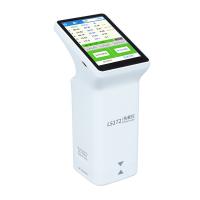
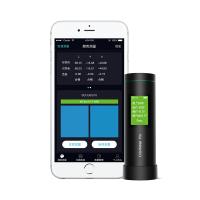
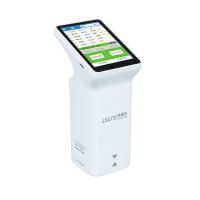
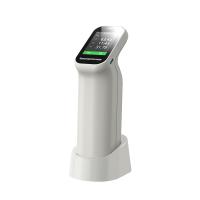
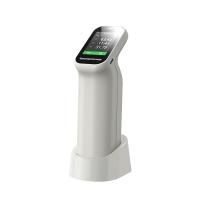
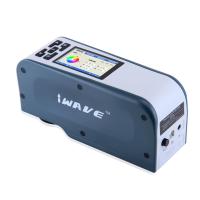
3Nh High Quality Portable Computer Colorimeter Operating Instructions (NR200, NH310, NH300)
overview
This computerized Colorimeter is developed in accordance with the CIE standard of the International Illumination Committee and the national standardThe Colorimeter is a high-precision computerized Colorimeter that is easy to use, fast to measure and stable in performance. ColorDifference meterIt can be powered by a lithium battery or an external power adapter.
The natural Colorimeter adopts an innovative patented technology - automatic black and white correction at start-up, which greatly simplifies the measurement stepSudden.
The natural Colorimeter adopts an innovative patented technology - dual positioning of camera framing and lighting, which is more accurate and fastMeasure and position quickly.
The natural Colorimeter has undergone extensive comprehensive trials and tests, employing more advanced scientific algorithms to make the measurement performanceIt is more stable, accurate, and has good compatibility.
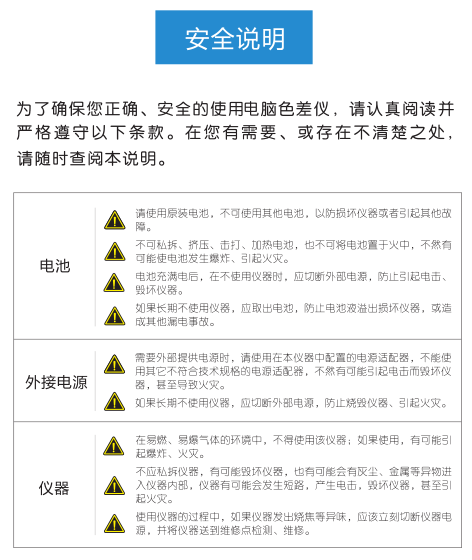
Precautions
1. This instrument is a precision measuring instrument, and drastic changes in the external environment of the instrument should be avoided during measurement.For example, the flickering of ambient light and the rapid change of temperature will affect the measurement accuracy of the instrument.
2. When measuring, the instrument should be kept stable, and the measurement port should be close to the measured object to avoid shaking and shiftingIt is forbidden to violently impact and collide with the instrument.
3. This instrument is not waterproof and cannot be used in high humidity environment or water.
4. The instrument should be kept clean and tidy, and dust, powder or solid foreign matter should be avoided from entering the measurement caliber and the instrumentDivision.
5. When this instrument is not in use, the instrument and whiteboard cover should be put into the packing box and stored properly.
6. If this instrument is not used for a long time, the battery should be removed to prevent damage to the instrument.
7. This instrument should be stored in a dry and cool environment.
8. The user shall not make any unauthorized disassembly and modification of the instrument, otherwise it may affect the measurement of the instrumentmeasure accuracy, and even cause irreversible damage
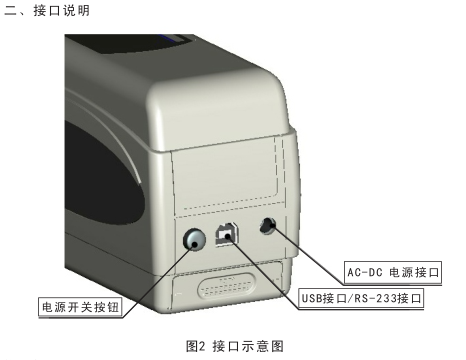
API introduction:
1. Power switch button: Press the button to start the Colorimeter, press the button again and the button will pop up, in this case, the power supply of the Colorimeter is cut off.
2. DC power interface: connect with the power adapter in the accessories for connecting external power supply and external power supplyThe specification is 5V==2A.
3. USB interface/RS-232 interface: This interface is a common interface, the instrument automatically judges the connection, and the USB interfaceFor communication with PC connection, the baud rate is 115200bps, and the RS-232 interface is used to connect the printer, baudThe rate is 19200bps.
Note: When an external power supply is connected, the switch button needs to be pressed to start the instrument.
3. Battery description and its installation
1. Please use the original lithium battery, do not use other batteries, otherwise it may be irreversibly damagedColorimeter.
2. If the Colorimeter is not used for a long time, the lithium battery must be removed from the Colorimeter to prevent the battery liquid from overflowing and damaging the coloraberCeremony.
3. The external power supply or USB interface of the Colorimeter is connected to the PC terminal, and when the power switch button is pressed, it will be on the lithiumThe battery is charged, if you don't want to charge the lithium battery, you can take out the lithium battery4. While charging the battery, in the upper right corner of the "Standard Measurement" and "Specimen Measurement" interfaces, there is a dynamicThe battery icon is displayed, as shown in the charging prompt on the "Standard Measurement" interface, and it is not chargedWhen the power is applied, the dynamic icon is not displayed.
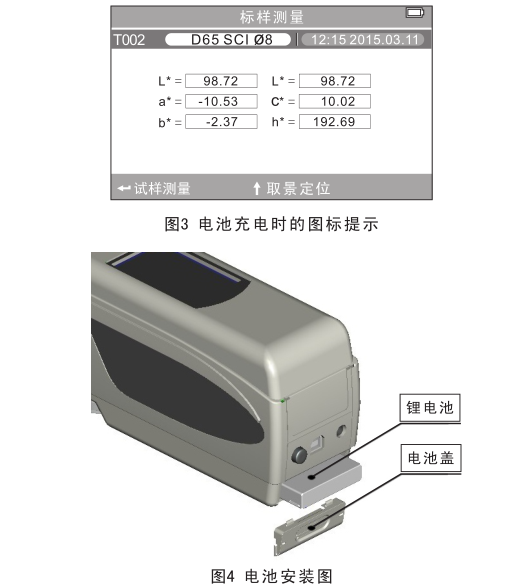
Power Installation:
1. Check whether the power switch button is pop-up (the power supply of the Colorimeter is cut off), and then remove the powerPool cover.
2. Put the lithium battery into the battery compartment and gently push it in, paying attention to the front and back of the battery and the direction of the contacts.
3. Cover the battery cover over the lithium battery and push up to install.
4. The battery specification is Li-ion 3.7V==0.5A.
Fourth, the instrument operation instructions
4.1 Power on
4.1.1 Preparation before start-up
a) Check whether there is battery power supply or external power supply.
b) Check whether the whiteboard cover is tightly connected with the instrument, if it is loose or the whiteboard cover is not tightly connected with the instrumentTo connect, the whiteboard cover must be attached and ensure that the connection is tight.
4.1.2 Power on
Press the power switch button on the back of the instrument, the monitor will light up and display the LOGO interface, wait a few seconds, the instrument will automatically enter the standard sample measurement interface, and the L*a*b*C*H* measurement interface will be displayed by default.
4.1.3 White correction and black correction
a), automatic white correction and black correction (recommended)
The instrument adopts a humanized design, and will automatically carry out white correction and black correction in the start-up stage, which is currently in useConvenient Colorimeter; When the instrument display enters the measurement interface after booting, the instrument has already startedAfter the white correction and black correction are completed, the whiteboard cover can be removed for color difference measurement.If the whiteboard cover is not covered or loose, the instrument will enter the "Automatic Whiteboard Correction Failed" interface after the instrument is turned on.
As shown in Figure 5 below, there are two options in the interface: "Re-whiteboard correction" and "Exit whiteboard correction".
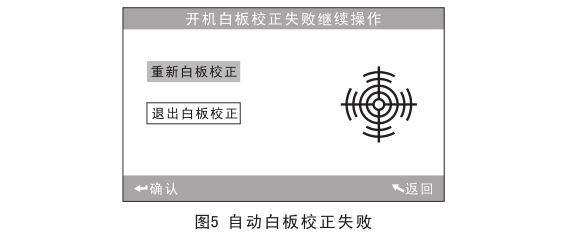
Select option 1, the interface will prompt you to cover the whiteboard cover, and after confirmation, the instrument will automatically re-whiteboard correction.
If option 2 is checked, the instrument will not be calibrated, and the operation interface will be directly entered, at this time, the instrument will use the last timeThe black and white board correction data.
b), manual white correction and black correction
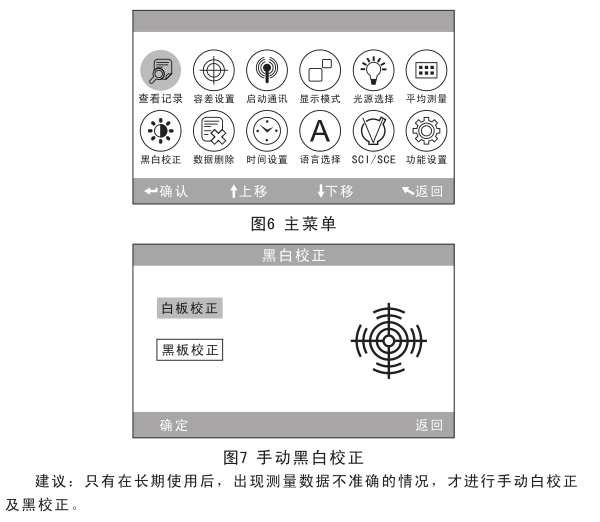
After the Colorimeter is started, press "Menu" to enter the main menu, as shown in Figure 6, in the main menuSelect Black & White Correction to enter the Black & White Correction page, as shown in Figure 7.
Make sure that the whiteboard cover is tightly connected to the instrument, select "Whiteboard Correction" and press the "Confirm" button to display the interfaceYou will be reminded to place the whiteboard box and press the "Confirm" button or the Measure button again to make the whiteboard correction.
Make sure the whiteboard cover is removed, select "Blackboard Correction" and press the "Confirm" button, and the display will be displayedWake up and point the measuring mouth to the air, then turn the Colorimeter to the air, and press the "confirm" button or the measurement button againblackboardCorrection.
Note: When the instrument performs a "blackboard correction" on the air, it must be surrounded by a dim and no bright light sourceenvironment, there is no obstruction within 3 meters of the instrument in the air direction.
At this point, the manual black and white correction is complete.
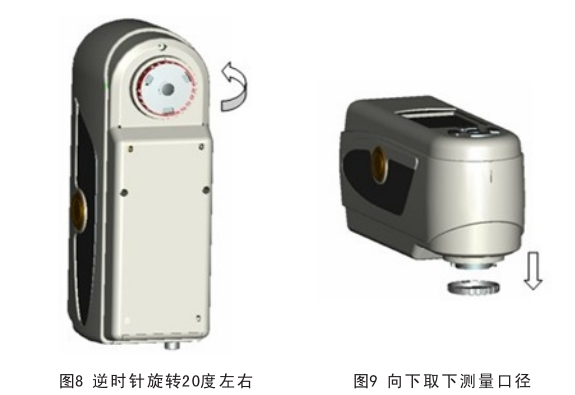
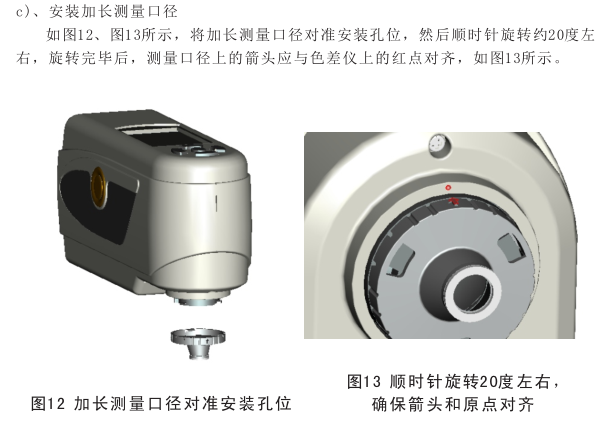
4.1.4 Replace the measuring aperture
Note: After changing the measuring aperture, you need to go to the "Function Settings" and "Measuring Caliber Selection" in the main menu", otherwise the measurement data may be inaccurate! There is a Φ8mm measuring aperture, Φ4mm measuring aperture, Φ8mm extended measuring aperture (optional) 3 kinds of measuring caliber, according to different sizesReplace with demand.
a), disassembly
As shown in Figure 8, Figure 9, rotate the measurement aperture counterclockwise by about 20° and remove the measurement downward.
4.2 Measurements
4.2.1 Methods for positioning and measuring samples
There are two ways to do this:
a) Camera framing positioning
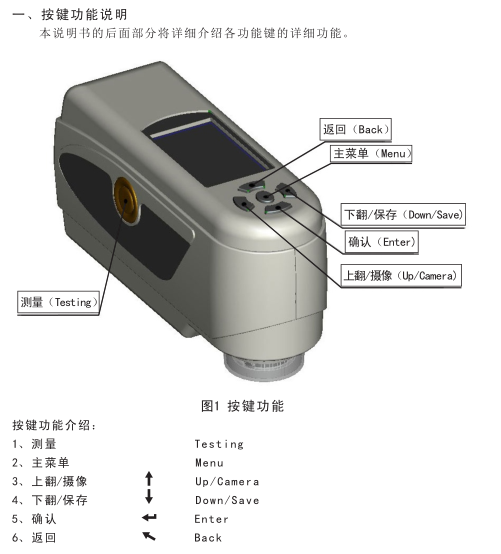
Enter the standard sample measurement interface or the sample measurement interface, and align and stick the measuring port to the sample to be measured, such as:If you need precise positioning, pressing the "Flip Up/Camera" button will start the camera's framing and positioning function, the display will show the fit between the measuring port and the measured sample in real time, and the display screen can assist in movingDynamic measuring port for precise positioning.
After the measuring port is aligned, press the "Measure" button, the instrument will exit the camera interface, and it will be completed after more than 1 secondSample color measurement, after the measurement is completed, the measurement interface of the display will display the color parameters of the measured sample。
b) Spot positioning
It can also be located by the measuring spot of the measuring port by entering the standard measurement interface or the specimenMeasure the interface, then press the "Measure" button and hold, at this point the measurement spot will appear, by observation measurementMeasure how well the spot matches the position of the sample to be measured, and at the same time bring the measuring port close to the sample to be measured and adjust the positionfor alignment.
After positioning, release the "Measure" button, and the Colorimeter will complete the measurement after more than 1 second, and display the sample being measuredColor parameters.
4.2.2 Standard measurement
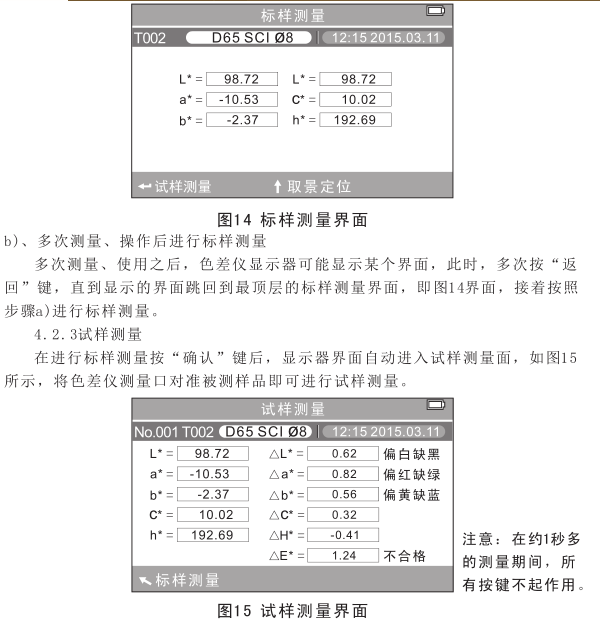
There are two situations for standard sample measurement, one is to carry out standard sample measurement after the start-up, and the other is to carry out standard sample measurementIn addition, after the Colorimeter is set to function, it will re-enter the standard measurement by pressing return continuously.
a) After the start-up, the standard sample measurement is carried out
After the Colorimeter is turned on, the display automatically enters the standard sample measurement interface, as shown in Figure 14The Colorimeter is aligned with the standard sample, press the "measure" button, and the Colorimeter obtains the color data of the standard sample.Press the "Confirm" button to enter the specimen measurement interface.
4.3 Saving Data
There are two ways to save measurement data.
4.3.1 Auto-Save
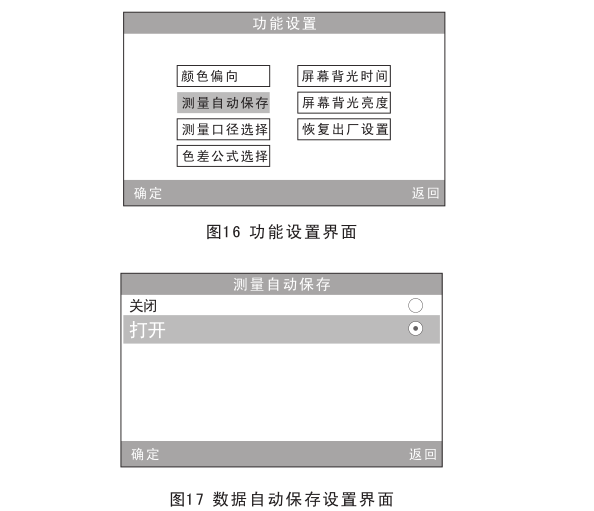
Press the "Menu" button to enter the main menu, select "Function Settings", enter the interface as shown in Figure 16, and select "Test".amount of auto-save", enter its status setting interface, as shown in Figure 17, select "Open", press "Confirm"key to save the settings. Once this is set, the measurement data is automatically saved.
4.3.2 Manual saving
If you select "Off" in the Fig. 17 settings screen, the data for each measurement will not be automatically savedIf you want to save the measurement data, press the "Flip Down/Save" button after the measurement.
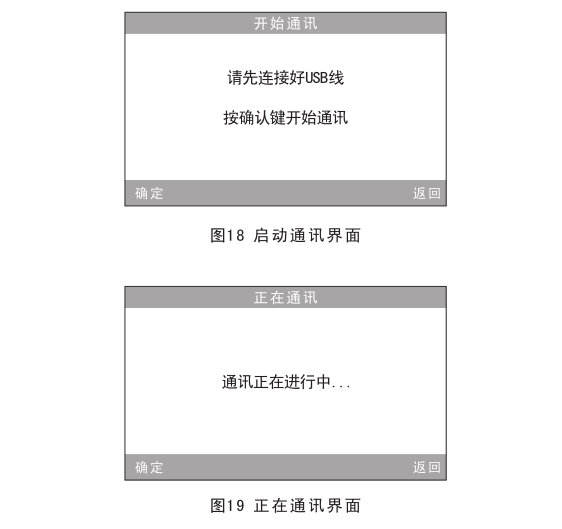
4.4 Communication with PCPress the "Main Menu" key to enter the main menu, select "Start Communication" to enter the interface as shown in Figure 18, and press the interfacePrompt: Use a data cable to connect the Colorimeter to the PC, and if the communication is successful, it will enter "Communication", as shown in the figure19Show.
4.5 Printing
The Colorimeter interface can only be printed when it is in the two interfaces of "standard measurement" and "sample measurement".The machine prints the corresponding content.
Connect the Colorimeter to the printer, and the Colorimeter will automatically print when it is in one of the two interfacesData measured by a Colorimeter.
5. Description of system functions
In addition to the "standard measurement" and "sample measurement" interfaces, other functional interfaces of the Colorimeter need to be passedThe main menu interface is entered, and the main menu interface is shown in Figure 20 above.
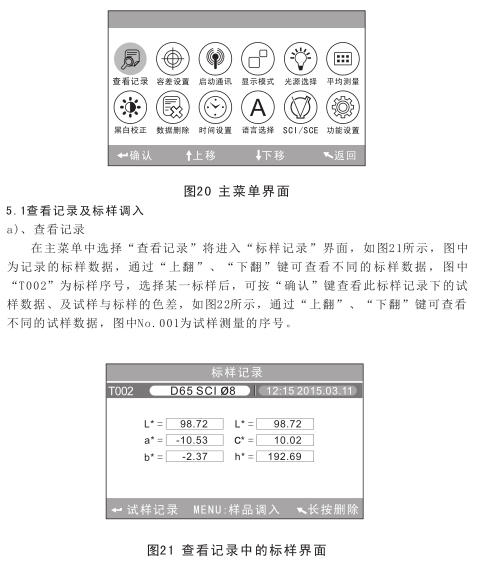
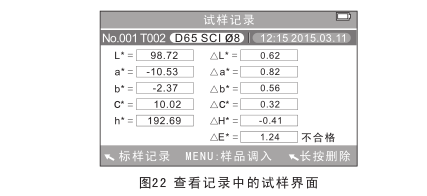
b), standard sample in
Sometimes you need to measure color aberration under a saved standard, which can be done by selecting "View" from the main menu"Record" will enter the standard sample viewing record interface, and you can find the required one through the "Flip Up" and "Flip Down" buttonsStandardsAfter the data is found, press the "Menu" button, at this time, the standard record is called into the measurement interface, press"Definitelyrecognize" button to start the specimen measurement under the standard.
c) The sample record is transferred as the standard sample
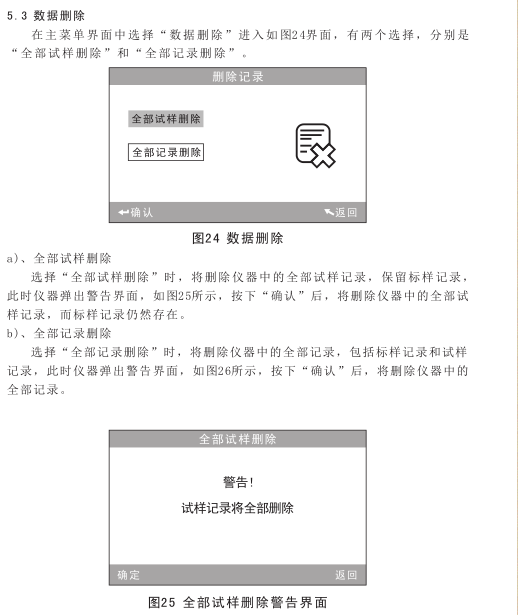
Sometimes it is necessary to use a saved specimen as a standard, which can be selected from the main menu to "View Records"Enter the specimen record viewing interface, as shown in Figure 22, through the "up" and "down" keys to find the placeYesAfter the specimen is recorded, press the "Menu" button, and the specimen record is called into the measurement interfacefor the mark, press the "Confirm" button to start the specimen measurement under the standard.
5.2 Tolerance Settings
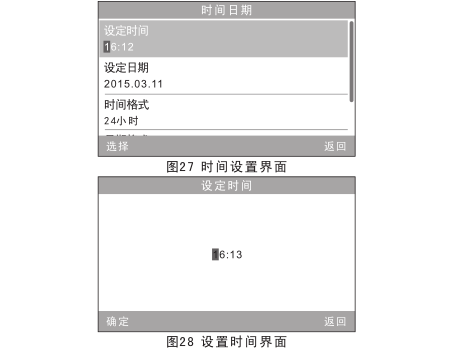
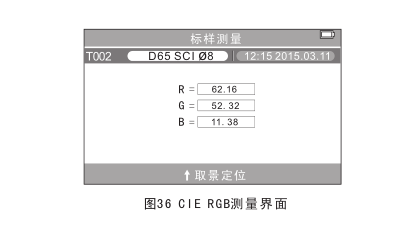
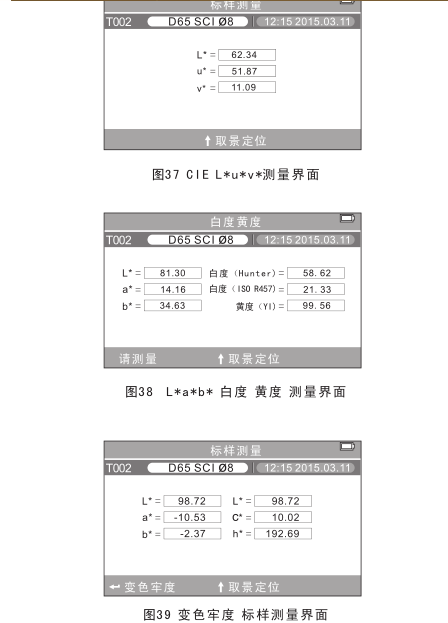
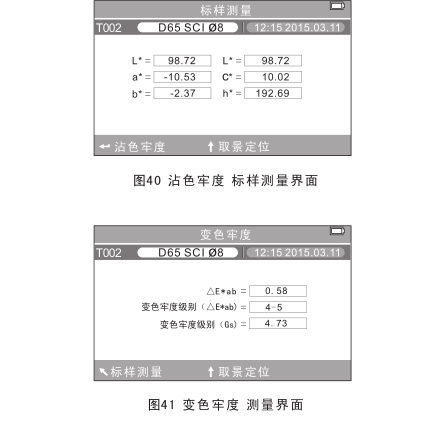
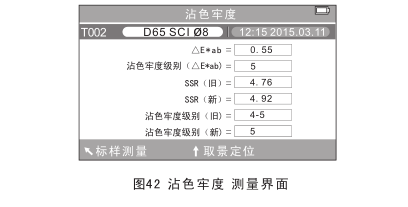
Selecting "Tolerance Setting" in the main menu interface will enter the tolerance setting interface, as shown in Figure 23, passedThe "Flip Up" and "Flip Down" keys can add and subtract the number where the cursor is located to the desired numberpresspress the "Confirm" button, and the cursor will jump to the next digit; When the cursor is over the last digit, pressunderThe "Confirm" button will save the settings and return to the main menu interface.If you don't want to set or modify the tolerance, you can press the "Back" key to return to the main menu interface.

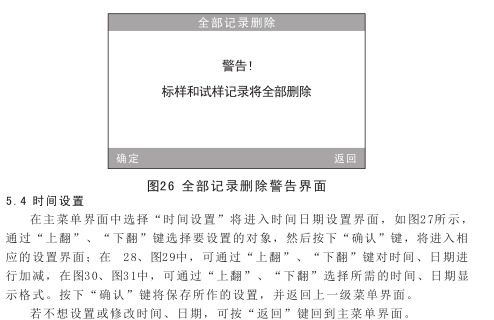
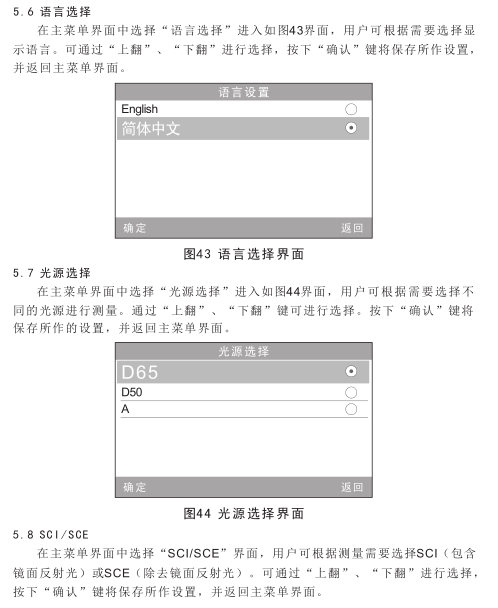
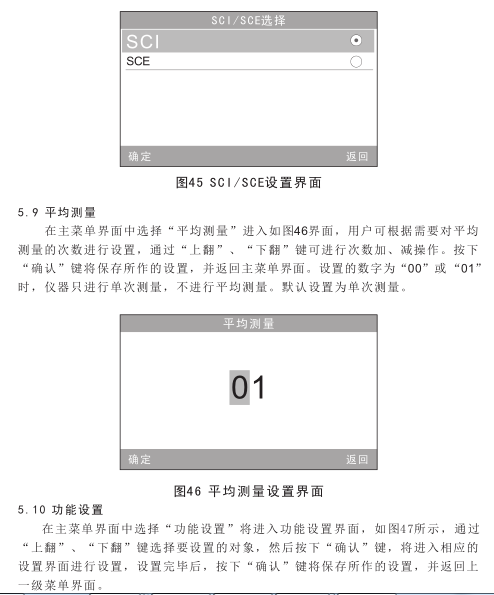
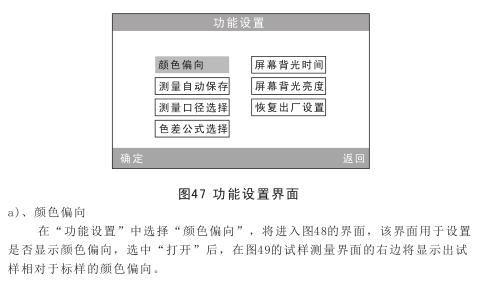
6. Product parameters
6.1 Product Features
1) Use camera framing for precise positioning, and you can also use lighting for positioning; The instrument is fully examinedConsidering the needs of users, adhering to humanized design, camera framing and positioning, lighting positioning technology,Users can choose to use it according to their needs.
2) The Colorimeter uses automatic black and white correction and is completed during start-up. The function is high in ensuring the instrumentIn the case of accuracy, the cumbersome manual black-and-white correction is eliminated, which greatly improves the high-precision ColorimeterEase of use, just start the Colorimeter every time and take measurements.
3) The standard deviation of the Colorimeter is △E*ab<0.06 (the average of 30 interval measurements after standard whiteboard correctionvalue).
4) The Colorimeter has a measuring aperture of Φ8mm, Φ4mm and an extended aperture (Φ8mm) (optional), which can be adaptedshould be different needs.
5) The Colorimeter adopts international standard light sources D65, D50 and A, which can be selected by users according to their needs。
6) The Colorimeter has a variety of color spaces, and the user can choose to display it according to his needs; And I can show whiteDegree, yellowness, color fastness and other data, widely used.
Technical parameters
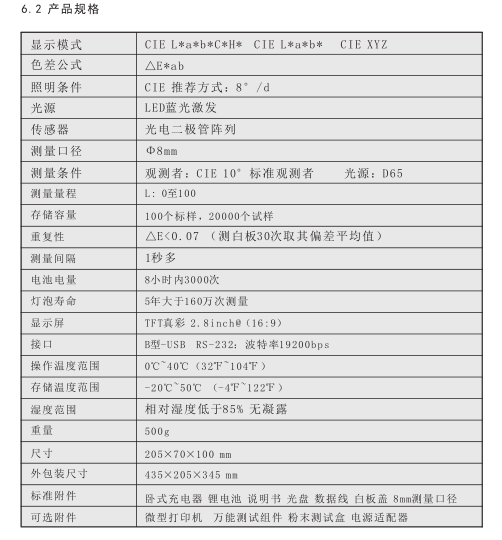
3nh High Quality Portable Computerized Colorimeter NR200 Technical Parameters
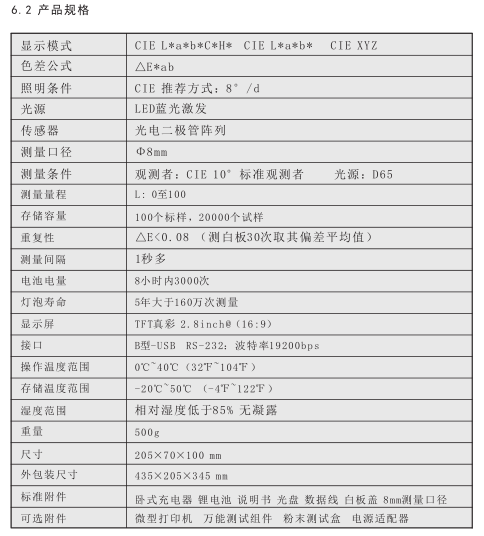
3nh High Quality Portable Computerized Colorimeter NH310 Technical Parameters
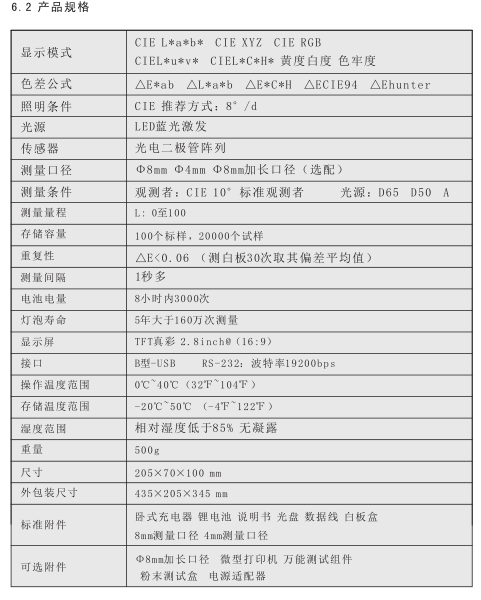
3nh High Quality Portable Computer Colorimeter NH300 Technical Parameters
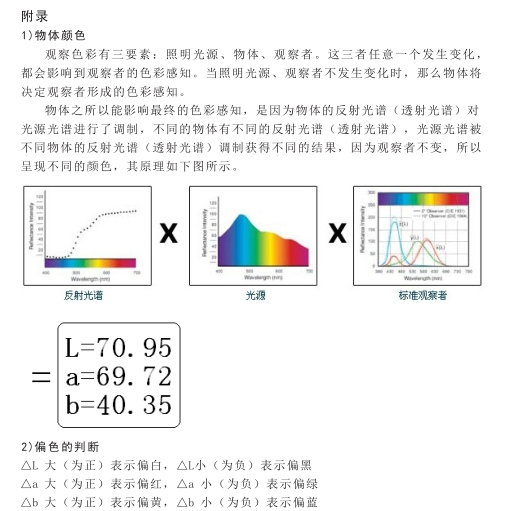
3) The human eye's discrimination of color
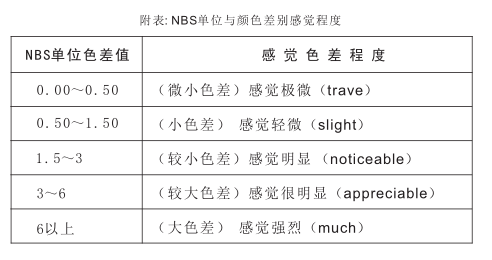
The NBS is a unit of chromatic aberration based on the chromatic aberration formula established by Judd-HunterIn 1939, the National Bureau of Standards adopted the formula for calculating the color differenceThe color difference of the color is calculated according to this formula, and when the absolute value is 1, it is called the "NBS color difference unit". Later developedThe new chromatic aberration formula, which often consciously adjusts the units to be close to the NBS units, such as Hunter Lab, CIELAB, CIE LUV, etc., all have roughly the same units as NBS units (not phases).etc.). Therefore, don't misunderstand that the units of chromatic difference calculated by other chromatic aberration formulas are NBS.
- 1Color difference meter and its application in Coating production
- 2Application of color reader in paper color difference control
- 3Principle, characteristics and application of Spinning & weaving precision color difference instrument
- 4Detection of film color retention with color reader
- 5Optical inspection structure for color readers: D/8 D/0 45 °/0
- 6Application of color reader in inks industry
- 7What is the difference between tristimulus Colorimeter and Colorimeter?
- 8FAQ of computer color reader and its solution
- 9Tristimulus Colorimeter:principle, application, operation and selection