GL0030 Glossiness Meter brief operating instructions
Introduction to GL0030 Gloss Meter
Model: GL0030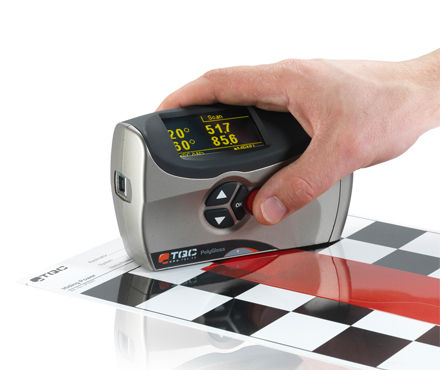
Name: Gloss Meter
Origin: Netherlands
Brand: TQC
Description: Three angle gloss meter. In addition to measuring 20° and 60°, an angle of 85° has been added, allowing PolyGloss to cover the entire spectrum. The measurement area at the 85° angle is low-gloss or matte surfaces.
GL0030 gloss meter button
 The SCAN button is used to scan the glossiness of the surface of the sample to be tested. It is also the power button of the gloss meter.
 arrow buttons. Used for menu selection.
 Down arrow button. Used for menu selection.
 Confirm button.
GL0030 Gloss Meter Operating Instructions
| project | menu | operate | options |
| start up | Press the "SCAN" button | ||
| Obtain information such as gloss meter model | Select "More" | ||
| scanning | Press and hold the "SCAN" button | ||
| Measurement (single reading) | Press the "SCAN" button once | ||
| calibration | Go to "Setup" | Enter "Calibrate" | |
| Adjust calibration value | Go to "Setup" | Go to "Calibrate Values" | |
| shutdown | Enter the "Main menu" main menu | Select "Power Off" to shut down |
Relevant knowledge
- 1How to calibrate the TQC Glossiness Meter? What is the calibrating procedure?
- 2Evaluation of color spectrum CS-380 three angle Glossiness Meter
- 3GM-268 Lantai glossiness instrument unpacking evaluation
- 4UK Sheen Ref. 157/60/SO Small Hole Gloss Meter Operating Instructions
- 53NH Glossiness Meter instruction manual (NHG268 NHG60 NHG60M)
- 6Weifu three-angle (20 °/60 °/85 °) glossiness instrument operating manual
Guess you like it
-
![DONGRU DR268 color screen three angle Glossmeter 0-2000Gs]()
-
![Defelsko PosiTector GLS 20/60/85 three angle Glossmeter standard edition]()
-
![3NH YG60 Single Angle Glossiness Meter]()
-
![3NH YG268 Glossiness Meter]()
-
![QILI SMN268 full smart Glossmeter]() QILI SMN268 full smart Glossmeter$ 823.00
QILI SMN268 full smart Glossmeter$ 823.00 -
![QILI MN268 three angle Glossmeter 20/60/85 ° three angle measurement Coating special]()