Anmiao AT-136PC Multifunctional Tachometer Operation Instructions
1. Product description
* One meter with multiple functions, one meter can be used as a photoelectric tachometer for non-contact speed measurement (r/min); it can also be used as a contact tachometer for speed and linear speed measurement (m/min, ft/min ) for contact measurements.
* Digital display, no parallax.
* Wide measuring range and high resolution.
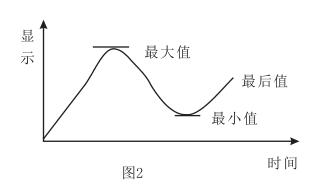
* Automatically memorize the maximum, minimum and last measured value during the measurement period.
* Sturdy and delicate structure, easy to carry. The whole machine adopts durable professional electronic components; the outer shell is made of light and hard ABS plastic, which is beautiful in shape and easy to use.
2. Technical Parameters
Display: 5-digit 10mm LCD display
Test range: Photoelectric: 2.5~99,999 revolutions per minute (r/min)
Contact: 0.5~19,999 rev/min (r/min)
Linear speed: 0.05~1999.9m/min (m/min)
0.2~6,560 ft/min (ft/min)
Resolution: Speed: 0.1 rpm (0.5~999.9 rpm)
1 rpm (over 1000 rpm)
Linear speed: 0.01 m/min (0.05~99.9 m/min)
1 m/min (above 100 m/min)
or 0.1 feet (0.1~999.9 feet/min)
1 inch (above 1000 inches/min)
Measurement accuracy: ±(0.05%n+1d)
Sampling time: 1.0 seconds (below 60 rpm)
Range selection: automatic switching
Memory function: automatically memorize the maximum value and minimum value during the measurement period
value and last measured value
Time Base: Quartz Crystal
Effective distance: 50~150mm (typical value) up to 300
mm depends on LED brightness
Power supply: 4X1.5V AA batteries.
Power consumption: Approx. 90 mA (during measurement)
Operating temperature: 0~50℃
Size: 210X60X38mm
Weight: 180g (including battery)
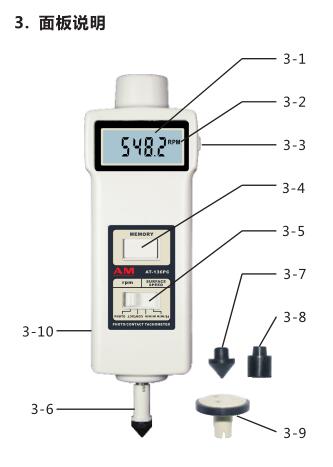
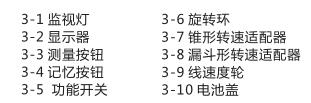
Standard accessories: host
Speed wheel
tapered adapter
funnel adapter
carrying case
manual
reflection band
4. Photoelectric measurement procedure
4.1 Put the function switch in the "PHOTO" position.
4.2 将反光纸贴在待测物体上,按下测量按钮,将可见光束对准目标,当反光纸通过光束时,监视灯亮。
4.3 待显示值稳定时,释放测量按钮, 此时无显示,但测量期间的最大值 、最小值和最后一个显示值自动记忆在仪表中。
4.3 若被测转速小于60转/分,建议均匀地多贴上几张反光标记,此时读数值除以反光标记的个数即可得到实际转速值。应注意非反射面积需要比反射面积要大,若被测物体表面反光,建议涂些黑漆后再贴上反光纸。 在贴上反光标记之前,转轴表面需要干净、平滑。
5.接触测量程序
5.1 转速测量
A. 将功能开关置于 “CONTACT” 位置。
B. 按下测量按钮,并将适配器顶在旋转转孔的中心,当读数稳定时,释放测量按钮。
5.2 线速度测量
A.将功能开关置于"m/min”(SURFACESPEED )位置或 "ft/min”(SURFACESPEED) 位置。
B.按下测量按钮,并将线速度轮附在待测物体上同步转动,当读数稳定时,释放测量按钮。
6.记忆功能说明
When the measurement button is released, nothing is displayed on the display, but the maximum, minimum and last measured values during the measurement ( as shown in Figure 2) are automatically stored in the meter. As long as the memory , the measured value will be displayed, the number will be displayed first, and then the English symbols will be displayed alternately. Among them, "UP" represents the maximum value, "dn" represents the minimum value, and "La" represents the last value. Each time the memory button is pressed, another memory . (See Figure 2).
7. Replace the battery
7.1 When the battery voltage is about 5V, the battery symbol will appear on the right side of the display, and the battery needs to be replaced.
7.2 Open the battery cover and take out the battery.
7.3 Install the battery correctly according to the label on the battery box.
7.4 If the meter will not be used for a long time, please take out the battery to prevent the battery from rot and damage the meter.
Note:
Specifications are subject to change without notice. We are not responsible for typographical errors.
