AWM-216-CN Whiteness Meter operating instructions
1. 用途及特性
* 白度计主要用于直接测量表面平整的物体或粉末的白度值。
* 可以广泛应用于纺织印染、油漆涂料、化工建材、纸张纸板、塑料制品、白色水泥、陶瓷、搪瓷、滑石粉、淀粉、面粉、食盐、洗涤剂、化妆品等物质的白度测量。
* 它由光源、光学系统、探测系统、数据处理与显示系统组成,本仪器的白度计算公式为蓝光白度R457。
* 定义完全漫反射体在可见光谱范围内的漫反射比均为1的称心表面的白度值为100,光谱反射因素为0的黑色表面的白度为0。
* 采用良好进口元器件,可靠性好。
* 合理简洁的光路设计,采用经修正的滤色系统,可以定量反映荧光增白后的白度值。
* 开机后无需预热,简单校准后即可进行测量,操作简便
* 可储存254组数据。
* 采用USB、RS-232C数据线输出与PC连接,进行数据采集。
* 另外有蓝牙Bluetooth数据输出提供选择。
* 通过严格检测、调试,仪器符合JJG 512-2002白度计检定规程,符合GB3978、GB3979、GB7973、GB7974、ISO2470、GB8904. 2、QB1840、GB2913、GB13025.2、GB1543、ISO2471、GB10339、GB5950、GB12911、GB2409等标准。
2. 工作原理
The light source of the instrument uses a 457 nm long-life LED, which meets the light source requirements stipulated in JJG 512-2002 National Metrology Verification Regulations . The measurement and reception of the instrument adopts the principle of photoelectric effect. by the light
The battery receives the radiance energy value diffusely reflected on the surface of the sample , and after being amplified by a high-precision automatic zero-stabilizing operational amplifier, it is input to the calibration circuit for energy value calibration, and then the digital display directly displays the whiteness value of the sample.
3. Precautions
This instrument is a measuring instrument, and it is strictly forbidden to disassemble it at will. Please read the instructions carefully before use .
* The working environment should be free of corrosive gases and vibration sources.
* There must be no strong light irradiation and magnetic field interference around.
* The surrounding air should be dry without dust and other floating objects.
* If the instrument is not used for a long time, please take out the battery to prevent battery leakage from corroding the internal circuit.
* Keep the inside of the measuring cylinder clean and clean, and do not touch the optical components with your hands, so as not to affect the spectral characteristics.
4. Instrument parameters
Measuring range: 0~120
Resolution: 0.1
Illumination conditions: 45/ 0
Light source: LED 457 nm light source
Whiteness formula: Blu-ray whiteness WB=R457
Measuring hole: 18x11 mm rectangle
Zero drift: ≤0. 1
Indication stability: ≤0.5
Measurement repeatability: ≤0.1
Operating conditions: Temperature: 0~40°C
Humidity: <85 %RH
Power supply: 3. 7V lithium battery
Dimensions: 140x45x75mm
Weight: 305 g (including battery)
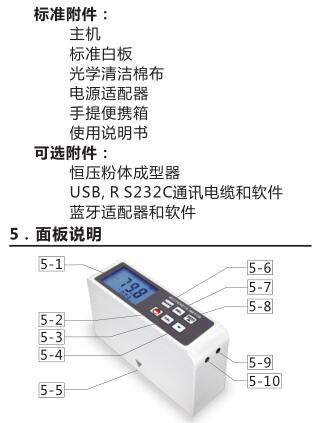
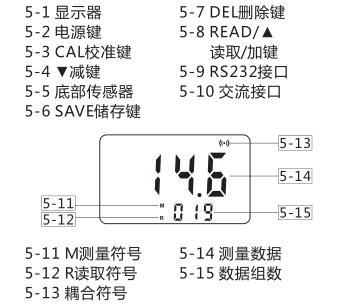
6. Measurement procedure
6.1 Instructions for use
6.1.1 Before using the instrument, it is necessary to read this manual carefully and strictly follow the prescribed working conditions and usage methods.
6.1.2 The standard white board is used for calibration when the instrument is working. It needs to keep the surface clean and cannot be exposed to dust , so as to avoid artificially affecting its nominal value.
6.1.3 保持仪器光学零件的干净,不要用手擦摸,如光学零件有灰尘,应用洗耳球吹去表面灰尘或用擦镜纸擦拭,如光学零件有油迹、霉点等,应用脱脂棉球蘸无水酒精擦拭零件表面。仪器不用时,要套上防尘罩,防尘罩自制。
6.1.4 在开机工作前,应用干净的光学清洁棉布将试样座及测量口擦拭干净,以免沾污白板及测试样品。
6.1.5 被测试样表面须均匀平整,在重复性测试时应保持被测样品纵横方向的一致性。对于非平整均匀被测试样(如粉末、颗粒、纤维状等)的测试,其取样方法见样品制作。
6.2 样品制作
6.2.1 如果样品的测量面,存在着无法改善的“不均匀”现象,或具有横、纵向纹痕的区别,则可将样品进行不同位置或不同角度的测量,取所测得白度值的平均值,代表此样品的白度。
6.2.2 对于纸张、布及各种纤维织品要取重叠若干层试样,使其不透光为止(如纸张则要取重叠50x70毫米的试样若干张使其不透光为止,即增加试样的张数白度值不变为止即为不透光)。
6.2.3 对于粉末或细小颗粒状样品,则应将样品盛放在粉末器中,用表面干净光洁的玻璃板将样品表面压平。由于不同的测试条件会带来不同的测试结果。所以,要想建立同类样品之间的白度值关系,则须统一规定测试样品的取样方法。包括重量、粒度及压紧方法,使样品之间有相近似的密度和表面平整度。若要求较高的测量精度,应选购恒压粉体成型器。
6.2.4 对于纤维状的物品,如棉花、化纤、羊毛、蚕丝等,先经整理,梳成一个纵向的表面,然后放在自制试样盒中进行测试,取样方法(包括数量)应该统一,且要多做几个试样测其平均值为宜。
6.3 测量与校准
6.3.1 仪器出厂已经调试,标定,可使用一段时间(时间长短视使用环境好坏而定)。开机后无需预热,可以直接测量。按下电源键开机,屏幕出现M符号,表示仪器处于测量状态。测量时将仪器平放在样品上,完全贴合在样品表面,屏幕上出现耦合符号,待读数稳定后,进行读数或储存数据。(数据储存详见
6.4.1)
6.3.2 仪器使用一段时间后,需要校准。此时只要将标准白板放在水平桌面上,将仪器平放在标准白板上,贴紧标准白板,按住CAL校准键大概1秒钟,屏幕显示CAL.字样,校准完成。可以继续进行测量。
6. 4 数据储存与查看
6.4.1 开机后,显示器上有M符号,表示仪器处于测量状态,可以进行数据的储存。同时,显示器上也显示储存数据组数。测量时,传感器部分与样品表面完全贴合,屏幕出现耦合符号,待读数稳定后,按下SAVE储存键,数据即储存在仪器内,储存数据组数加一。本仪器最多可以储存254组数据。
6.4.2 要查看已储存的数据,只要轻按READ/▲读取/加键,显示器上的M符号消失,出现R符号,表示仪器进入读取状态。
这时按READ/▲读取/加键或▼减键来查看仪器内的数据。
6.4.3 要退出读取状态,只要轻按电源键即可。
6.5 数据的删除
对数据的删除有两种方法,单个删除和全部删除。
A. 在读取状态下,可以对数据进行单个删除。利用READ/▲读取/加键、减键调出当前数据后,轻按DEL删除键,当前数据即刻被删除。删除最后一组数据后,屏幕显示Err1,表示数据已经被全部清除。
B. 要删除全部数据,只需要在测量状态下按住DEL删除键,大概3秒钟,储存的数据即会被全部删除。删除后,屏幕也会显示Err1,表示数据全部清除。
7. 测量数据传输至计算机
7.1 USB,RS232联机操作
7.1.1 当仪器选配RS232软件及相关配件时,可以把测量数据传输至计算机。
7.1.2 Put the RS232 software CD into the CD drive of the computer, and install the software.
7.1.3 Connect the instrument to the computer .
7.1.4 Press READ/▲ to read/add to transfer the stored data to the computer in sequence, and the user can export the required file format according to actual needs.
7.1.5 For online measurement, see Demo.exe in the software CD for details .
7.2 Bluetooth online operation When the instrument is equipped with a Bluetooth online module and its adapter, the measurement data can also be transmitted to the computer. For details on the Bluetooth connection operation, refer to the "Bluetooth Adapter Operation Guide".
8. Maintenance
8.1 Standard Whiteboard
The standard whiteboard for random work should be regularly sent to the superior measurement unit or the industry testing center for approval, and it is recommended to be once every six months . If it is contaminated, it should be sent for inspection and re-calibrated in time .
8.2 Light source lens
It is strictly forbidden to touch with hands, so as not to leave sweat marks and affect the spectral transmittance. After a long period of use, use absorbent cotton dipped in absolute alcohol, hold it with tweezers, carefully wipe the lens surface, and then wipe it clean with dry absorbent cotton .
