Research on Colorschemer studio of Leather Pigment
This paper mainly uses computer programming technology combined with the principle of leather color matching to realize the use of computer for leather pigment paste color matching in leather production.
The research results show that color matching by computer is better than manual color matching, and it is feasible to use this technology in production.
Color matching is an important process in tanning production [1]. At present, most tanneries still use artificial color matching, which is time-consuming and laborious, which greatly limits the improvement of tannery production efficiency. The application of computer instead of manual color matching can greatly improve the production efficiency of the factory. Therefore, it will be a trend to apply computer color matching in tanneries.
1 History, method and principle of computer color matching
The development of computer technology enables computers to provide people with more and more convenience and speed, and the field of color matching in tanneries is no exception. At present, software developers have developed a lot of color matching software, which can be divided into two major aspects according to their color matching principles, namely: database-based computer color matching software and computer direct color matching software.
1.1 Database type computer color matching software
Since the current database technology has been quite perfect, the database software is also rich. Small databases range from DOS DBASE, FOXBASE to WINDOWS FOXPRO to VISUALFOXPRO, and large and medium-sized databases include MICROSOFT's SOLSERVER and SUN's ORACLE. Therefore, this kind of color matching software is more mature. The principle of this kind of color matching software is mainly to first input the color and its formula into the database to make a database file, and then set it to use the color field as the index. When color matching, the color is first read in, and the computer finds the same color or similar color records according to the color matching algorithm, and then prints the formula of the color. The advantage of using this kind of software is that the technology is mature and the development risk is small, but its disadvantages are also obvious, that is, the development workload is heavy, more color formulas need to be input, and the color matching is not flexible. If the required color is not in the color library when matching, it cannot be matched by this system. At present, when using computer color matching, most of them use this kind of color matching software.
1.2 Computer direct color matching software
Direct computer color matching is to read in the required color matching and reference color during color matching, and through the internal conversion of the computer, the computer directly calculates the standard formula ratio, and then prints out the result, which makes it not need the support of the database. This thesis is exactly preliminary study this class software, and its principle is as follows 1.21.
1.2.1 Description of color
Light with different spectral energy distribution stimulates the human visual system to produce different colors (including color and gray). Color can be described from two perspectives.
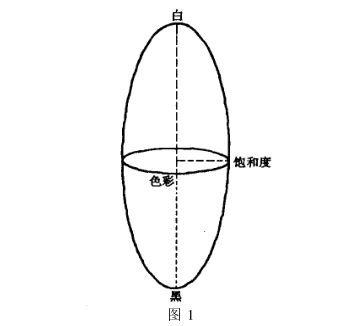
From a visual point of view: Color is described by hue (H), saturation (S), and lightness. Hue refers to whether the color is red, blue, or green. It is an important feature that distinguishes one color from another. Saturation reflects the purity of a color, and when white is added to a color, its saturation is reduced. Brightness is the brightness of light perceived by the human eye. The relationship between color saturation and lightness is shown in Figure 1. Lightness varies along the center of the color, hue varies along the circumference, and saturation varies along the radius. The red, green, and blue marks marked in Figure 2 indicate their relative positions in the color space. It is worth noting that: color saturation and lightness are subjective quantities, and they are inaccurate descriptions of colors.
From a physical (chromatic) point of view, color is described by dominant wavelength (D), color purity (P) and brightness. They correspond to the above three quantities one by one, and the dominant wavelength determines the basic color of the color. Color purity reflects the ratio of pure, light to white light in that color, with brightness as previously stated.
1.2.2 The principle of color matching of three primary colors
The description of color requires three quantities, which shows that the color space is three-dimensional. Among them, any three colors that are not related to each other (the combination of any two cannot produce a third color) constitute a set of bases in the color space, called the three primary colors. The three primary colors commonly used in computers are red (R), green (G) and blue (B). The three primary colors can produce all colors through proper mixing. Since the three primary colors adopted in the Chinese W operating system are red, green, and blue, red, green, and blue (RGB) are also used as the three primary colors in this study. Taking the three primary colors of red, green, and blue as the three axes of a space coordinate system becomes the color coordinate and coordinate system, and the coordinate range is [0,255] (this is represented in WINDOWS). Then the color coordinates of the three primary colors [R], [G], [B] are (255,0,0), (0,255,0), (0,0,255) respectively.
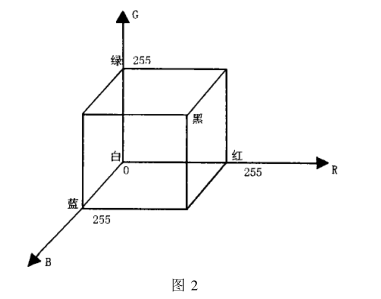
It can also be known from Fig. 2 that the white coordinates are (0,0,0), the black coordinates are (255,255,255) and the color on the line connecting black and white is gray. Because the point determined by the color coordinates is in space, and as mentioned above, to match a certain color, the color needs to be surrounded by the reference color, so it is necessary to convert all the color coordinates to the same plane.
Let the coordinates of a certain color be (X, Y, Z) and make the base chromaticity coordinates be (X, y, z) as follows:
x=XAX+Y+Z), y=YAX+Y+Z), z=Z/(X+Y+Z)
Then the point must be in the plane x+y+z=1. At this time, the distance between the point determined by the color to be matched and each reference color point can be calculated through the chromaticity coordinates. The inverse ratio of the distance is the ratio of the desired color matching formula. If the water content of the pigment paste is considered, the obtained formula ratio can be divided by the respective water content.
1.2.3 Gray scale processing
Since the brightness of the color changes when converting the color coordinates to chromaticity coordinates, it is necessary to use black and white paste to adjust the brightness of the color when converting the color coordinates, and then convert the color coordinates to chromaticity coordinates (specifically Algorithm see code).
2 Development of computer color matching system
2.1 Fundamentals of program development
2.1.1 Program development environment and tools
Application of MicrosoftVisualCH~~h6.0 in Windows environment for program development.
2.1.2 Program development module
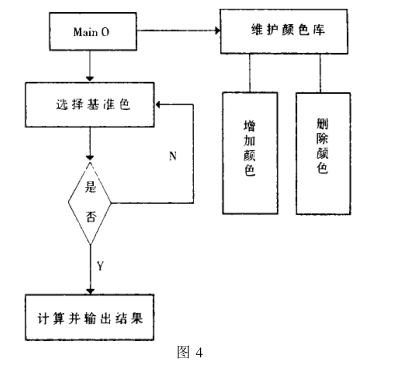
The program is mainly divided into two modules: calculation part and color library part.
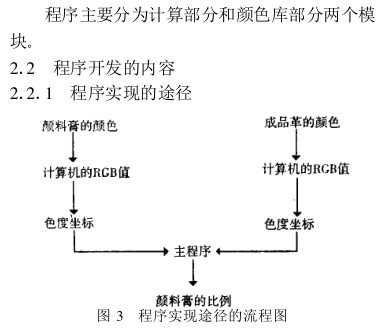
2 program flow chart (see Figure 4)
2.2.3 Program algorithm realization
2.2.3.1 Realization of color library
The R, G, and B values of each color can be used as a file to obtain the RGB value of the color, and then save it in the same directory. Enter this value in the program, click the Add button in the program, and the program will automatically create the color library file of the color.
2.2.3.2 Realization of calculation
First select and use several reference colors in the program, and then select various reference colors and final colors. If you click the "OK" button when the color is not selected, a message dialog box will appear in the program to prompt "The color is not selected completely". If the selected color cannot match the final color, the program
2.2.4 Program running results and discussion
After compiling and running the program, apply pigments for debugging, use the results calculated by this program for color matching, and most of the errors of the final color are smaller, indicating that all the algorithms in this system are correct. Some of the results have errors mainly because there are errors in reading the RGB values of the colors. Therefore, when improving this software in the future, the focus should be on the color picking part.
3 Conclusion
1 It is completely possible to use computers instead of manual color matching in tanneries.
2. Computer direct color matching system is achievable, and it is more flexible than database color matching software, and the maintenance cost is low.
3 This system can be completely applied to factory production after improving the color picking part.
- 1Color spectrum computer color scheme software color scheme effect? Xiaotiao takes you to see
- 2Influence of ColorSchemer studio on color scheme results
- 3Discussion on the development of domestic (CN) Colorschemer studio
- 4Color reproduction technology of camouflage spots based on Colibri Colorschemer studio
- 5Colorschemer studio SRICI-PIP and its accuracy evaluation
- 6Printing ink Colorschemer studio
- 7FAQ analysis and countermeasures of emulsion paint color matching
- 8ColorSchemer studio Printing ink color scheme
- 9Introduction of color scheme of emulsion paint