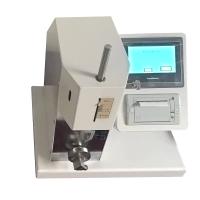
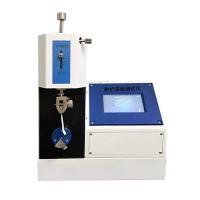
YT-CTM Folding Tester Instruction Manual
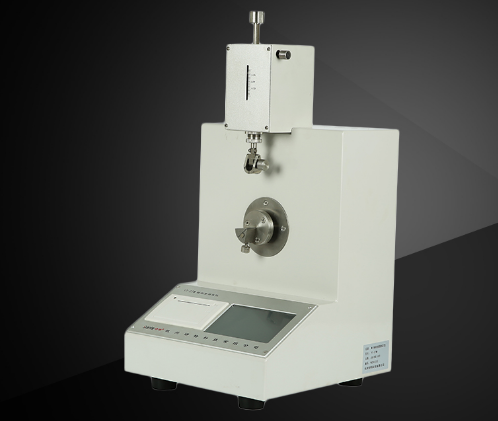
YT-CTM耐折度测定仪采用专业的32位的ARM处理器,保证控制和运算速度和精度;采用5寸彩色触摸屏液晶显示器,操作方便、显示清晰;采用高性能步进电机及驱动器,旋转角度、折叠速度精准稳定。
2安装放置及注意事项
2.1仪器应安放在坚固平稳的水平台面上。
2.2.将仪器电源插入仪器左后下部的电源插座,以便为仪器供电。
3产品结构
本仪器为光机电一体化结构。机械部分包括电机转动部分和张力结构部分。在机械传动部分方面是通过控制步进电机带动折叠夹头的来回 135°转动。此传动机构传动平稳,故障率极低,传动方式可靠。张力机构通过下压
张力杆使张开弹簧产生变形,形成的弹簧力对被测纸样施力。(被测纸样所受力的大小由弹簧所产生的形变调节。)
仪器通过光电电路的检测能对被测纸样的双折次数进行计算,并能使电机在试样测试完毕后自动停止。同时,仪器还通过霍尔电路的检测实现折叠夹头的自动归位。
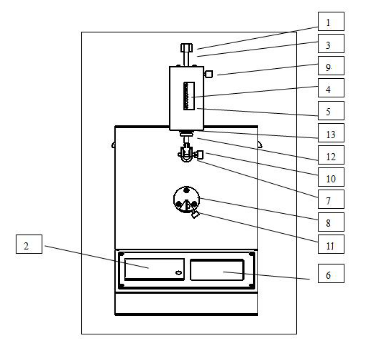
1、张力托;2、打印机;3、张力杆;4、张力指针;5、力值标签;6、触摸显示屏;7、张力夹头;8、折叠夹头;9、张力杆紧固螺钉;10、张力夹头旋钮;11、折叠夹头旋钮;12、锁紧旋钮;13、调节旋钮
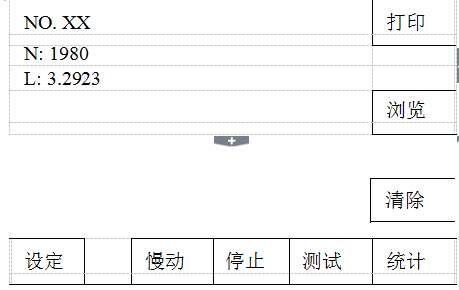
【设定】键,设置弹簧张力、系统时间、厂家设置。
【慢动】键,检查折叠夹头旋转角度,按【停止】键退出。
【停止】键,待机时,按此键折叠夹头自动对中;在试验状态时退出试验状态;在慢动状态下停止慢动,折叠夹头自动对中。
【测试】键,完成试验夹持后,按此键进入测试。
[Statistics] key, after finishing a group of sample testing (more than 3 samples), press this key to process statistical data and display statistical data, press [Print] key to print statistical data.
[Clear] button, click this button to delete the last test; double click this button to clear all test data.
【Browse】key to view the tested data.
[Print] key, after testing a sample, press this key to print a single data.
5 Operation Guide
5.1 Turn on the machine and press the power switch on the back of the instrument. After the power is turned on, the display window will display "Folding Endurance Tester". After a few seconds, the folding chuck will automatically center itself.
5.2 Setting parameters If the sample setting meets your needs, you don’t need to go through this step, and go directly to step (3).
a. Spring tension setting: Press【Set】key, click【①Spring Tension X.XX N】item, press number keys to input data, press【Enter】to complete the input.
b. System time setting: press【SET】key, click 【②XXXX-XX-XX XX:XX:XX】item, press number keys to input "year" data, press 【OK】key to input "year", and then By analogy, enter "month", "date", "hour", "minute", "second".
5.3 clamp sample
Three scale scale
Press down the tension support so that the tension pointer on the tension rod indicates 9.81N, turn the tightening knob of the tension rod, clamp the tension of the sample between the folding chuck, fix the tension chuck first, then fix the folding chuck, clamp The specimen is required to be tensioned and not twisted. Then loosen the tension rod fastening knob.
5.4 Determination of the sample Press the [Test] key, and the folding chuck will automatically fold until it breaks. When folding, the window displays the number of folds in real time, and after breaking, it displays the final number of folds and folding endurance (that is, the logarithmic value of the number of double folds with base 10). Press【Print】button for the current test value (folding times, folding endurance).
5.5 Clear If the folding does not meet the requirements this time, you can press the [Clear] key, the data of this time will not be included in the original statistical data, and the test data of this time will be invalid. Press【Clear】key twice continuously, all measured values will be deleted.
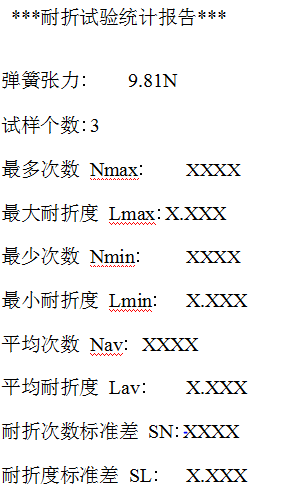
5.6 Printing After stretching a group of samples, if you want to print the parameters of this group of samples, press the [Statistics] and [Print] keys to print out the set value: spring tension, calculated value: test The number of samples and the average value, maximum value, and standard deviation of each parameter.
The print format is as follows:
5.7 shutdown
Press the power switch, so the display goes out, and the set data is saved.
- 1Folding Tester - paper folding performance test
- 2Talking about the application of folding resistance Tester in metal foil
- 3Plastic film folding resistance testing by folding resistance Tester
- 4How is the folding resistance Tester used for the detection of tissue paper?
- 5Analysis on the Application of Folding Tester in Cardboard
- 6What is the folding resistance of paper and cardboard?
- 7What are the factors that affect folding endurance?
- 8Test method and principle of corrugated cardboard folding resistance meter
- 9FRANK horizontal refractometer test method