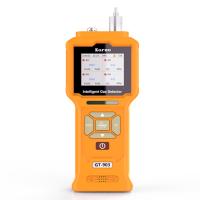
Common faults and maintenance of Tiger TIGER LT VOC Detector
Basic faults or diagnostics are represented by icons. When a fault occurs, it can be corrected in most cases by pressing the Enter key or the Esc key to clear the fault message. All fault conditions result in an alarm from TIGERLT.
pump failure
Pump clogged or pump failure

Airflow through the instrument is less than 100 cc per minute. Check the probe and filter for clogging. Water or dust in the probe, bent probe, dirty inlet filter, or blocked outlet (check with finger on hole in back) can all cause low airflow. If the blockage has been eliminated, the alarm can be cleared by pressing the exit key. If the fault persists, return the instrument to your dealer for repair.
battery invalid

When the battery power is too low or the battery power is lower than 2%, TIGERLT will shut down. Charge the battery as described in the "Battery" section of this manual, making sure everything is well assembled and the indicator light on the charger is in good condition. If the battery fails to charge, another battery pack can be installed (if available). If using alkaline batteries, the batteries are replaceable. If the fault persists, return the instrument and charger to your dealer for repair.
light off

Indicator light failure PID light fails to light up: This can happen at power on or during use. Please turn off TIGERLT and replace the indicator light. See the "Maintenance" chapter.
memory is full

Memory cannot receive more data Data record memory is full. This happens only if the "Log Full" checkbox is set to "Alarm" in the TIGERLT PC configuration screen. Press Escape to continue, but TIGERLT will no longer record data. Select "Recycle" in TIGER PCLT, TIGERLT will overwrite the earlier data without giving an alarm.
system error

Overall System Failure Instrument firmware is corrupted. Rarely will this happen, but if it does, please contact Ion Science Ltd or a nearby Authorized Service Centre.




- 1VOC Detector technology analysis: complete guide to principles, types and applications
- 2PIDs - Common equipment for emergency services responding to HAZMAT incidents
- 3Make it easy for you to use the ionic science tiger VOC Detector
- 4UK ION SCIENCE Tiger VOC Detector screen display description
- 5British ion Tiger Tiger brand VOC Detector
- 6Tiger LT series VOC Detector how to calibrate?
- 7TIGER LT Series Handheld VOC Detectors
- 8Influence of hot pressing process and environment parameters on TVOC and formaldehyde release from particle board
王敬贤;沈隽 - 《生物质材料科学与技术教育部重点实验室》