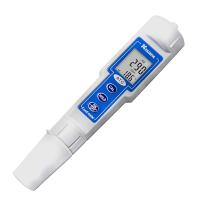
3020M laboratory conductivity meter operating instructions
A. Preparation of standard solution
Suitable standard solution preparation powders need to use commercial or research grade powders. The following are the preparation methods of three concentrations of standard solutions. Users can use them to calibrate the conductivity .
1. 14.94uS standard solution (25°C): Accurately measure 100ml of 147uS standard solution and dissolve it in 900ml of distilled water.
2. 147uS standard solution (25°C): Accurately measure 100ml of 1413uS standard solution and dissolve it in 900ml of distilled water.
3. 1413uS standard solution (25°C): Accurately weigh 0.746 g of research grade KCL and dissolve it in 1000ml of pure water.
4. 147uS standard solution (25°C): Accurately measure 100ml of 1413uS standard solution and dissolve it in 900ml of distilled water.
5. 12.90mS standard solution (25°C): Accurately weigh 7.4365 g of research grade KCL and dissolve it in 1000ml of pure water.
6. 111.9mS standard solution (25°C): Accurately weigh 74.264 g of research grade KCL and dissolve it in 1000ml of pure water.
[Note: You can store leftover unused standard solutions in airtight containers at temperatures below 4°C for a week. If you have doubts about the accuracy of the standard solution, please prepare a new standard solution. ]
B. Conductivity Calibration
The correction step includes five steps: correction of TDS coefficient, conductance cell constant, temperature coefficient, reference temperature and conductivity value. The detailed steps are as follows:
1. Connect the conductivity electrode 3020P (K=0.475) or 109P (K=0.1) to the input . After pressing the switch key to turn on the machine, the host will display "CELL" and the cell constant of the conductance electrode stored in the microprocessor . (factory set to K=0.475)
2. When the temperature reading is stable, press the “CAL” key to enter the calibration mode. "CAL" will be displayed on the LCD. Pressing the "MODE" key will continue to display the following parameters.
TDS
The TDS total solid dissolved amount is obtained , and the factory setting value is 0.65. You can use the up and down keys to adjust the TDS factor value , and the adjustment range is 0.30~1.00. Press the "ENTER" key to save the new set value, or press the "MODE" key to exit the storage and enter the "Constant" interface.
constant
Use the up and down keys to select the electrode constant: "C0.5" or "C0.1", press the "ENTER" key to save the selected constant value, and the machine will automatically enter the next calibration parameter; or press the "MODE" key to exit Save, the constant value stored last time will be retained , and automatically enter the "temperature coefficient" calibration interface.
Temperature Coefficient
This instrument uses temperature coefficient to calculate the conductivity value with temperature compensation. The default value of this temperature coefficient is 1.91%. You can use the up and down keys to adjust the value of the temperature coefficient . The adjustment range is 0.00~4.00%, press "Enter ” key to save the new set value, or press the “Mode” key to exit the storage and enter the “Reference Temperature” interface.
reference temperature
The instrument uses the reference temperature to calculate the conductivity value with temperature compensation, and the default value of the reference temperature is 25°C. You can use the up and down keys to adjust the reference temperature value, the adjustment range is 15~25°C, press the "ENTER" key to save the new set value, or press the "MODE" key to exit the storage and enter the "Conductivity Calibration" interface .
Conductivity correction
(a) After cleaning the conductivity electrode, put it into a standard solution with known conductivity. The choice of this standard solution is better based on the range of the conductivity value of the measured solution. Immerse the electrode in the standard solution (at least 2~3 inches or 5~7cm), and agitate slightly to eliminate air bubbles on the electrode pad.
(b) Wait a while for the temperature to stabilize. During this period, the main unit displays "rAGE", indicating that the main unit is automatically capturing the measurement range, which is normal. When the temperature is stable, you can use the up and down keys to adjust the standard conductivity value (25°C), and press the "ENTER" key to confirm. When the main unit beeps, it means that the calibration step has been successfully completed, and the main unit automatically exits to the measurement mode.
C. Measurement of Conductivity
1. After the electrode is connected to the instrument, turn it on, put the cleaned electrode directly into the solution to be tested (submerge at least 2~3 inches or 5~7cm), and stir slightly to drive out the air bubbles on the electrode sheet .
2. Press the "MODE" key to switch to the parameter you need to measure. It is normal for the machine to display "rAGE" when the range . When the temperature is stable, the measured value can be read , which is the measured value of the solution being tested.
D. Store, recall and clear data
a. Store data.
1. In the conductivity, salinity, total dissolved solids with temperature compensation and conductivity without temperature compensation mode, press the "CLEAR/ENTER" key once, and the machine will store the current data value. At this time, "Save" will be displayed once, and a position number will also be displayed at the same time, indicating that current interface value has been stored and a record of this position number has been made.
2. If "Full" is displayed on the interface, it means that the 50 sets of data of the machine have been fully stored and no other data can be stored. Users can only delete or delete part of the data to store new data.
b. Call back the stored data.
1. Press the "MODE" key to enter the callback mode, press the "CLEAR/ENTER" key, the machine will display last set of stored data.
2. At this time, press the up key or down key to select the position number and find the stored data you need to read. .
3. After reading the stored data, press the "MODE" key to exit the callback mode.
c. Clear stored data.
1. Press the "MODE" key to enter the clearing mode, press the "CLEAR/ENTER" key, the machine will enter the selection of the clearing mode, press the up key or down key to choose between "Delete All" and "Delete Each".
2. On the "Delete All" interface, press this key once, the machine will delete all stored data , and display None, indicating no stored data.
3. On the “Delete Each” interface, press this key once, and the machine will enter the interface for deleting a single stored data. At this time, you can press the up and down keys to select the position number to be deleted, press this key to confirm, and the machine will delete The stored data of this position number, at the same time, the stored data of this position number will be replaced by the stored data of the next position number.
For example: 01,400uS,25℃;
02,5mS,23.8℃;
03,18mS,15.6℃;
…
If the stored data of 02 position number is cleared, the stored data of the machine becomes:
01,400uS,25℃;
02,18mS,15.6℃;
…
4. After clearing the data, press the "MODE" key to exit the clearing mode.


- 1The Working Principle of Gel Conductivity Meter Has Been Detailed
- 2Detection Principle and Application Analysis of Conductivity Meter
- 3Principle of Conductivity Analyzer
- 4Several common electrode types for Conductivity Meters
- 5Differences between three STIP-scans: pH Meter, Conductivity Meter, and Dissolved Oxygen Meter
- 6Conductivity Meter and Ion Meter specific differences
- 7Common types and application differences of STIP-scan
- 8How to detect the conductivity of lithium battery coating slurry?
- 9How to choose a high-precision conductivity meter?