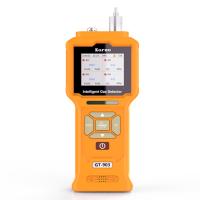
UK ION SCIENCE Tiger VOC Detector screen display description
British ion science Tiger Tiger VOC Detector screen display description screen display
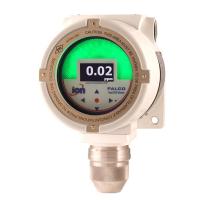
The display is divided into four sections.
Fixed LCD status icons at the top of the screen provide at-a-glance information on instrument status. Icons are only displayed when the corresponding function is selected. The main screen in the center shows the readings only in large numbers, and the Tiger instrument automatically scales the readings so that as the VOC reading increases, the number of decimal places displayed decreases accordingly, from 0.001 ppm to 19,999 ppm (isobutylene equivalent) . Two softkey fields are provided on the sides as softkey indicators. The area between the softkey indicators shows the units of measure.

 Health and Safety (Optional): This icon has only one segment and will flash when an alarm condition occurs and when health and safety readings are collected.
 Peak Hold: This icon will be displayed when the peak hold function is turned on.
 Memory Status: This icon is only displayed if the instrument has data logging capability. The box is divided into four divisions, indicating the used size of the data logging memory.
Empty boxes = 100% memory available, four filled boxes indicate full.
 USB: This icon will appear when a host device is connected.
 Battery Status: The icon consists of a box and four segments. Each additional bar represents 0-25, 26-50, 51-75 and 76-100% power respectively. When the battery is depleted, the box will flash for 1 minute and then turn off the instrument. While charging, fill one cell by one until it is 100% fully charged.
 Backlight: When the backlight is on, the beamlines will be displayed.
 Sound: The body of the icon is always displayed.
If all 3 alarm sounders are disabled and the volume is at 0%, a disabled cross-hair will be displayed. Three sound projection lines are used to indicate the volume level.
But there are actually four volume levels, with the lightest volume having no cast line.
 Alarm Bell: The icon consists of 2 parts, the alarm bell and the sound line. The alarm bell and one sound line will flash when the instrument reaches the "low limit alarm" and the alarm bell and two sound lines will flash when the "high limit alarm" is reached.
 Flash/Torch: When the flash/torch is activated, the beamline will be displayed.
 Lock: When TIGER configuration is locked in TIGER PC, the lock icon will be displayed. The softkeys in the button A column will
is enabled and the softkeys in the button column B are disabled.
The following icons will be displayed in the softkey area as softkey options. They can be selected using the up and down keys. Features marked "Optional" will only be shown if the TIGER has this feature.
These icons can be reorganized using TIGER PC software.






- 1VOC Detector technology analysis: complete guide to principles, types and applications
- 2PIDs - Common equipment for emergency services responding to HAZMAT incidents
- 3Make it easy for you to use the ionic science tiger VOC Detector
- 4British ion Tiger Tiger brand VOC Detector
- 5Tiger LT series VOC Detector how to calibrate?
- 6Common faults and maintenance of Tiger TIGER LT VOC Detector
- 7TIGER LT Series Handheld VOC Detectors
- 8Influence of hot pressing process and environment parameters on TVOC and formaldehyde release from particle board
王敬贤;沈隽 - 《生物质材料科学与技术教育部重点实验室》