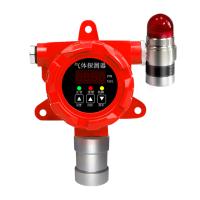
Dorui DR-BX100 Portable Gas Leak Detector Operation Instructions
. Instructions
1. Power on and off
This manual takes methane gas as an example:
① Start up:
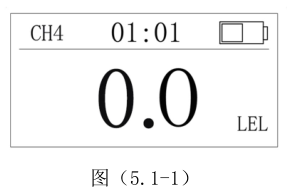
In the shutdown state, press the [On/Off Key] for 3 seconds to enter the 60-second power preheating state, and the system will automatically execute the self-test procedure to complete the startup. Display as shown in (5.1-1)
Shown:
② Shutdown:
On the home page (under the real-time concentration display interface), press the [On/Off Key] for 3 seconds, the buzzer will sound once and then the machine will shut down.
. 2. Basic operation
① When the gas concentration is higher than the low alarm set value, it will display "low", and will send out a low frequency alarm and vibration (at this time the alarm will record the current information for future ).
② When the gas concentration is higher than the high alarm setting value, it will display "high", and will send out high-frequency alarm and vibration (at this time, the alarm will record the current information for future ).
③ On the home page (under the real-time concentration display interface), press the [On/Off Key] to display the current calendar, body temperature, and accurate power.
④ On the home page (under the real-time concentration display interface), press the [minus key] to display the gas type, gas range, high alarm value, and low alarm value.
⑤ On the home page (under the real-time concentration display interface), press the [Add key] to enter the alarm record query, and a new record will be displayed at this time. As shown in Figure (5.2-1)
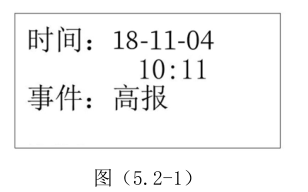
In this interface, press the [plus and minus keys] to turn the page to view the recent alarm records; press the [open key] to exit the query interface.
• After high-low alarms, the device will automatically record the current gas concentration at regular intervals.
• Normal events will show the time . After the gas concentration returns to normal, the gas concentration will no longer be recorded.
. 3. Device Settings
On the home page (under the real-time concentration display interface), press the [minus key] for 3 seconds to enter
"Settings" menu, and the setting menu interface will be displayed. As shown in Figure (5.3-1)
Note: Non-professionals should not modify internal parameters.
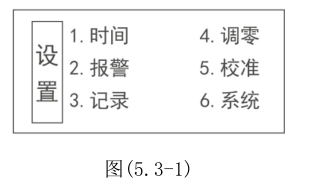
In the setting menu, press the [plus and minus keys] to move the selection item, press the [on key] to enter the corresponding sub-interface; in the setting menu interface, press and hold the [on key] for 2 seconds to exit the "settings" menu interface.
① Time setting In the "Settings" menu interface, press the [plus and minus keys] to move the selection item, select " time ", press the [on key] to enter the time interface; in the "time" interface, set the current time, press the [on key] ] to move the options, press the [addition and subtraction keys] to adjust the time, after adjustment, press and hold the [on/off key] for 2 seconds, save the settings and exit the "time" setting interface.
② Alarm setting In the "Settings" menu interface, press the [plus and minus keys] to move the selection item, select " alarm ", press the [on key] to enter the "alarm" interface; in the "alarm" interface, set the high alarm value and low alarm value. For the alarm value, press the [On/Off Key] to move the options, press the [Addition and Subtraction Key] to adjust the alarm value, after adjustment, press and hold the [On/Off Key] for 2 seconds to save the settings and exit the "Alarm" setting interface.
③ Record setting: In the "Settings" menu interface, press the [plus and minus keys] to move the selection item, select " record ", press the [on key] to enter the "record" interface; in the "record" interface, set the time for alarm recording interval, press the [addition and subtraction keys] to adjust the alarm value, after adjustment, press and hold the [on/off key] for 2 seconds to save the settings and exit the “ record ” setting interface.
④ 调零设置当设备在清洁的空气中,长时间不归零,或者显示为“E2”错误时,请按照下列“调零”步骤,进行“调零”设置;在“设置”菜单界面,按【加减键】移动选择项,选择“调零”,按一下【开关键】进入“调零”界面;在“调零”界面,设置是否“确认调零”,按【加减键】选择“确认”,按一下【开关键】,设备会自动调零,参数正确,设备显示“修改成功”,并保存当前零点值,返回后显示零。注意:如果参数超出调零的范围,设备会显示“错误”,参数不保存,此时请检查仪器。
. 4. 设备校准
设备校准需要在标准气体(10%LEL 甲烷标定气)准备好的前提下进行。校准操作时,在“设置”菜单界面,按【加减键】移动选择项,选择“校准”,按一下【开关键】进入“校准”界面,此时会显示校准界面,如图(5.4-1)所示
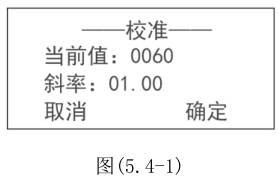
校准时,请通入标准气体,观察当前值,等待数值稳定,调整斜率的大小,斜率调大后,当前值会变大,斜率减小时,当前值会减小。通过调整斜率的大小,调整当前显示数值与标气浓度一致,然后待数值是否稳定后,点击“确定”,保存数值并退出点击“取消”,退出校准选项,不保存设置。校准后,返回首页等待数值归零,归零后,再通入标气,观察数值与标气浓度是否一致,一致则表示标定成功,否则失败。
注意:没有标准气,请勿修改斜率!
. 5. 系统界面
On the "Settings" menu interface, press the [plus and minus keys] to move the selection item, select " system ", and press the [on key] to enter the "system" interface; in the "system" interface, the factory time and serial number of the device will be displayed , press and hold the [On/Off Key] for 2 seconds to exit the " System " interface.