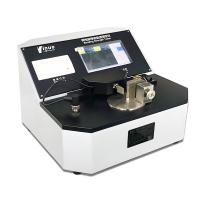
Yinuo Microcomputer Bending Stiffness Tester Operation Manual
Steps
1 equipment preparation
1.1 Plug in the power, turn on the power switch, and warm up the machine for 15 minutes.
1.2 If it is an automatic version, connect the air source, check the air pressure, and make sure that the air pressure is within a reasonable pressure range. Judging whether the pressure is reasonable and whether the pressure is clamping
The destruction of the sample during the holding process is the judgment standard. For example, a sample that is more elastic and more easily deformed should use a small pressure.
1.3 Make sure that the equipment is level and there is no vibration, and that the airflow at the location of the equipment does not change much (the wind is not strong).
1.4 Ensure that the instrument has been calibrated. (For how to calibrate the instrument, please refer to the instrument calibration section)
2 sample preparation
2.1 Ensure the integrity of the sample: Take a sample and check whether the sample is complete. There should be no creases, wrinkles, damage or other defects visible to the naked eye. If there is a watermark, it should be noted in the report.
2.2 Use a special sampler to cut the sample into a rectangle with a length of 70mm and a width of 38mm ± 0.2mm. If there are vertical and horizontal testing requirements, samples should be taken in the vertical and horizontal directions respectively. The same direction is the test direction. When testing a set of data, ensure that the sample direction is consistent. If the instrument used can only bend to one side, at least 10 samples are required. If the instrument can bend to two sides, each direction requires 5 pieces of specimens, after testing, the specimens removed from the test clips cannot be reused.
3 detection process
3.1 Test settings
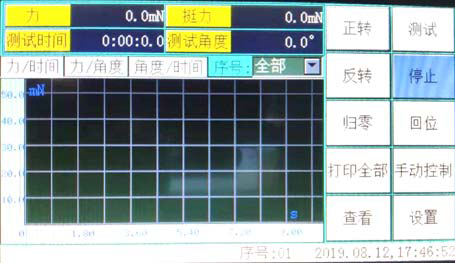
Turn on the machine to enter the main interface, click the setting button to enter the sample program interface.
3.2 Test plan setting
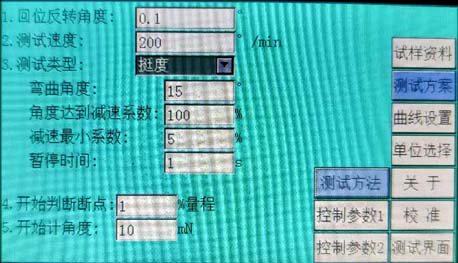
According to the requirements of the test, the test angle, sample type, etc. are .
Test angle: input the required test angle
Test Type: Choose between Bending Stiffness or Crease Stiffness
Test speed: It has been set at the factory, no need to set
Others have been set at the factory, no need to set.
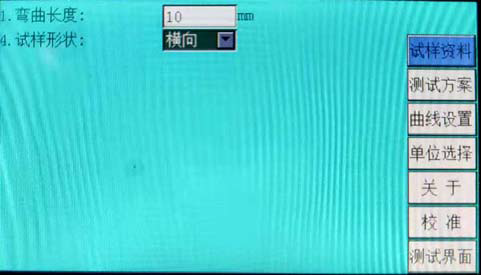
Click the sample data button to set the length of the sample and the direction of the sample .
3.3 Test
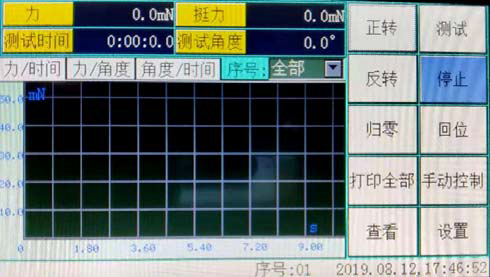
Click "Test Interface" to enter the test preparation state After completing the test condition setting, the device basically enters the test preparation state
1. Put the sample on the sample fixture, make sure that the left side of the sample can reach the test contact, and ensure that the sample is level.
2. Click "Test" on the touch screen, the device will automatically complete the test, and automatically reset after the test is completed.
3. Test more than 5 samples for each group of samples.
3. View data, delete data, print results
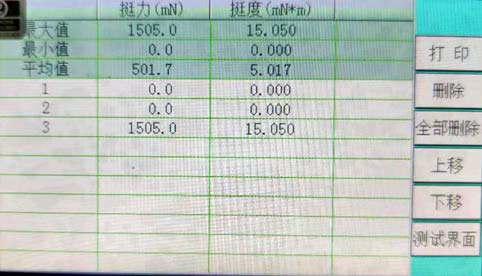
Click "View/Print" to enter the data processing page
1. The left side of the page is the result of each test.
2. The right side of the page is the summary of test results
3. For test results that do not meet the requirements, you can click the result first, and then click "Delete" to delete the result. Click "Delete All" to delete all results.
Click "Print" to print the test report
maintenance
The operator should be familiar with the instruction manual, strictly abide by the operating procedures, and do the following maintenance work:
1. Always keep the testing machine clean, and cover it to prevent dust when it is not used for a long time.
2. When the testing machine breaks down, please ask professionals to check and eliminate it, and do not run it with a disease.
3. A small amount of lubricating oil should be added to the transmission screw part of the testing machine from time to time.
Adhere to periodic verification and maintain the excellent technical condition of the testing machine. The verification cycle is generally one year.