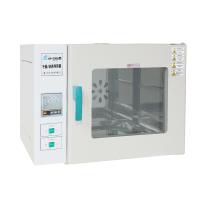
Mold Incubator specific operation method steps
操作步骤
1、控制器上电,显示窗上排显示【分度号和仪表型号】,下排显示【版本号】约3秒后进入到正常显示状态
2、温度及时间的参看与设定
说明:定时功能和定时方式(正/倒计时)可选,详见内部参数表-2中参数ndt和ndE的值。
1)若无定时功能:
点击【设定】键,进入到温度设定状态,显示窗上排显示提示符“SP”,下排显示温度设定值,可通过【增加】、【减小】和【移位】键修改到所需的设定值;再点击【设定】键,退出此设定状态,修改的设定值自动保存。
2)若有定时功能
点击【设定】键,进入到温度设定状态,显示窗上排显示提示符“SP”,下排显示温度设定值,修改方法同上;再点击【设定】键,进入到时间设定状态,显示窗上排显示提示符“ST”,下排显示时间设定值;再点击【设定】键,退出此设定状态,修改的设定值自动保存。
当时间设为“0”时,表示没有定时功能,仪表连续运行,显示窗下排显示温度设定值;当设定时间不为“0”时,显示窗口下排显示运行时间,“时间单位”点亮,开始计时时,“时间单位”闪烁,计时时间到,运行结束,显示窗下排显示“End”,蜂鸣器断续鸣叫EST秒(详见内部参数表-2)后停止鸣叫。定时运行结束后,长按【减小】键3秒可重新启动运行。
3、温度测量值异常报警
若显示窗上排显示“----”,表示温度传感器故障或温度超过测量范围或控制器本身故障,控制器自动断开加热输出,蜂鸣器连续鸣叫,报警灯常亮,请仔细检查温度传感器及其接线。
4、上偏差超温报警时,蜂鸣器嘀、嘀声鸣叫,“ALM”报警灯常亮,断开加热输出;下偏差超温报警时,蜂鸣器嘀、嘀声鸣叫,“ALM”报警灯闪烁;若由于改变温度设定值而产生超温报警,“ALM”报警灯不亮,蜂鸣器也不鸣叫。
5、正常显示状态下,长按增加键2秒可手动锁屏,锁屏状态下可点击增加键解除锁屏;或在主界面下,一定时间无按键操作后自动锁屏(详见内部参数表-1 参数Lct)。
6. When the buzzer sounds, press any key to silence it.
Reference and setting of internal parameters
In the normal display state, press and hold the [Setting] button for 3 seconds, the password prompt "Lc" will be displayed on the upper row of the display window, and the password value will be displayed on the lower row, which can be modified to The desired password value. Then click the [Setting] button, if the password value is incorrect, the controller will automatically return to the normal display state, if the password value is correct, it will enter the internal parameter setting state, and then click the [Setting] button to modify each parameter in turn. Press and hold the [SET] button for 3 seconds to exit this state, and the parameter value will be saved automatically. See the table below for details:
| parameter indication | parameter name | Parameter function description | (range) factory value |
| Lc | password | When "Lc=3", you can check and modify the parameter value. | 0 |
| ALH | Upper deviation over temperature alarm | When "temperature measurement value > temperature setting value + ALH", there is an upper deviation over-temperature alarm (see 5.4). | (0~50.0℃) 5.0 |
| ALL | Lower deviation over temperature alarm | When "temperature measurement value < temperature setting value + ALL", there is a lower deviation over-temperature alarm (see 5.4). Note: When "ALL=0", the lower deviation alarm is invalid. | (-50.0~0℃) 0 |
| Lct | lock screen time | Automatic screen lock time, no automatic screen lock at 0, no screen lock at -1. | (-1 to 999 seconds) 0 |
| CT | compressor start delay | Compressor start delay protection time, the minimum time interval from stop to restart of the compressor. | (0~600 seconds) 180 |
| FIL | filter coefficient | Filter coefficient for temperature measurements. | (1~200) 50 |
| Lt | Light off delay | When the light is turned on, it will be turned off automatically after a delay of Lt time. If "Lt=0", the time delay is invalid, and the lighting lamp must be turned off manually. | (0~30 points) 2 |
| Cnd | Compressor start and stop mode | Only works if the compressor works intermittently ! 0: Start and stop the compressor automatically (automatically judged by the controller) 1: Start and stop the compressor manually (use the values of uP and dn) | (0~1) 0 |
| uP | Compressor start threshold | Only valid if the compressor works intermittently and "Cnd=1" ! If "temperature measurement value ≥ temperature setting value + uP" and the compressor start delay time is up, start the compressor. If "temperature measurement value < temperature setting value + dn", turn off the compressor. | (-10.0~10.0℃) 0.4 |
| dn | Compressor off threshold | (-10.0℃~uP)0.4 | |
| P | proportional band | Time proportional action adjustment. | (0.1~80.0℃) 10.0 |
| I | Integration time | Integral action regulation. | (1~2000 seconds) 500 |
| d | Differential time | Differential action regulation. | (0~1000 seconds) 200 |
| T | control cycle | Heating control cycle. | (1~60 seconds) 5 |
| Pb | Measurement temperature deviation correction | It is usually used to correct errors in low temperature measurements. | (-50.0~50.0℃) |
| Pb=actual temperature value-instrument measurement value | 0 | ||
| PL | Measured temperature slope correction | It is usually used to correct errors generated in high temperature measurement. | (-999~999) |
| PL= 1000 * (actual temperature value - meter measurement value) ÷ meter measurement value | 0 | ||
| Adr | mailing address | The communication address of this machine. | (1~32) 1 |
Internal parameter table-2
| parameter indication | parameter name | Parameter function description | (range) factory value |
| Lc | password | When "Lc=9", you can check and modify the parameter value. | 0 |
| wxya | Temperature alarm mode | 0: Only temperature upper deviation over-temperature alarm; 1: Temperature upper and lower deviation over-temperature alarm at the same time | (0~1) 0 |
| FCH | Fan type | 0: long-axis fan; 1: short-axis fan Note 1 | (0~1) 0 |
| ndc | How the compressor works | 0: The compressor only works intermittently; 1: The compressor judges the compressor’s balanced or intermittent operation according to the value of CP (see below); 2: The compressor judges the compression according to the value of Htd (see below) Machine balance or intermittent work. | (0~2) 0 |
| CP | Compressor working mode fixed switching point | When "ndc=1", if "temperature setting value ≥ CP", the compressor works intermittently, otherwise it works in a balanced manner. | (0~200.0℃) 30 |
| Htd | Compressor working mode automatic switching point | When "ndc=2", if "temperature setting value ≥ ambient temperature + Htd", the compressor will work intermittently, otherwise it will work in balance. | (-50.0~50.0℃)0 |
| AnP | Prohibition of compressor operating temperature point | When "temperature measurement value ≥ AnP", the compressor is absolutely prohibited from working. | (0~200.0℃) 60 |
| CnP | Working temperature point without compressor | When "temperature setting value ≥ CnP", the compressor will only be turned on once when the temperature measurement value is higher than the temperature setting value. | (0~200.0℃) 42 |
| ndt | Timing function | 0: no timing function; 1: constant temperature timing; 2: power-on timing; | (0~2) 1 |
| E | Timing method | 0: counting down, that is, the time column of the main interface displays the accumulated time; 1: countdown, that is, the time column of the main interface displays the remaining time; | (0~1)0 |
| h | unit of time | 0: minute timing; 1: hour timing | (0~1) 0 |
| SPd | Constant temperature deviation | When the difference between the temperature measurement value and the set value is within SPd, it enters the constant temperature stage. | (0.1~50.0℃) 0.5 |
| EST | Timing end reminder time | 当定时结束后,蜂鸣器提示时间。注:当“EST=9999”时,表示持续提示。 | (0~9999秒) 60 |
| EH | 定时结束是否继续恒温控制 | 0:定时结束后关断所有输出;1:定时结束后继续恒温控制。 | (0~1) 0 |
| nP | 最大功率输出 | 加热输出的最大功率百分比。 | (0~100%) 100 |
| Lco | 低温控制时加热关断偏差 | 当“温度测量值≥温度设定值+Lco”时,关断加热输出。 注2 | (-10.0~10.0℃) -0.5 |
| SPL | 最小温度设定值 | 温度设定值的最小值。 | (-90.0~50.0℃)0 |
| SPH | 最大温度设定值 | 温度设定值的最大值。 | (SPL~200.0℃) 80 |
注1:若设备使用的风机由于本身发热会引起被控对象的温度升高较大,请选择短轴风机。
注2:仅当压缩机以间断式工作且“温度设定值<环境温度”时才有效。
内部参数表 -3
| 参数指示 | 参数名称 | 参数功能说明 | (范 围) 出厂值 |
| Lc | 密码 | “Lc=18”时可查看环境温度。 | 0 |
| Ht | 环境温度 | 显示当前控制器所处环境温度。 | |
| HPb | 环境温度偏差修正 | HPb = 实际环境温度-显示环境温度Ht值。 | (-50.0~50.0℃) 0 |
内部参数表 -4
| 参数指示 | 参数名称 | 参数功能说明 | (范 围) 出厂值 |
| Lc | 密码 | “Lc=567”时可查看并修改参数值。 | 0 |
| rST | 恢复 | 0: 取消恢复出厂值; | (0~1) |
| 出厂值 | 1: 确认恢复出厂值。 | 0 |
内部参数表 -5
| 参数指示 | 参数名称 | 参数功能说明 | (范 围)出厂值 |
| Lc | 密码 | “Lc=27”时可查看并修改参数值。 | 0 |
| ndH | 报警继电器功能选择 | 0:报警继电器为报警输出功能;1:报警继电器为定时结束提示功能。 | (0~1) 0 |
| ndu | 继电器工作模式 | 0:According to设定值工作:在“温度设定值≥dP”时,继电器常开点闭合。在“温度设定值<dP”时,且“温度测量值<dP+3.0℃”继电器常开点断开。1:According to测量值工作:在“温度测量值≥dP”时,继电器常开点闭合。在“温度测量值<dP”时继电器常开点断开。2:电磁阀泄压功能,duL和duH值有效。 | (0~2) 0 |
| dP | 分界点 | 温度分度点,According tondu参数选择设置。 | (-90.0~200.0℃) 15.0 |
| duL | 泄压电磁阀启动阀值 | 当压缩机以平衡方式工作时,若“温度测量值≤温度设定值+duL”,启动泄压电磁阀;当压缩机以断开方式工作时,若压缩机停止工作,则启动泄压电磁阀。 | (-5.0~0.0℃) 0 |
| duH | 泄压电磁阀关闭阀值 | 当压缩机以平衡方式工作时,若“温度测量值≥温度设定值+duH”,关闭泄压电磁阀;当压缩机以断开方式工作时,若压缩机开始工作,则关闭泄压电磁阀。注:当压缩机以平衡方式工作时,若“duL=0”且“duH=0”,则泄压电磁阀始终处于关闭状态。 | (0.0~5.0℃) 0 |
| ndF | 蒸发器化霜方式 | 0:无化霜功能;1:电磁阀化霜;2:电热管化霜; | (0~2)0 |
| dT1 | 化霜间隔1 | 当“温度设定值≤8.0℃”时的化霜时间间隔。注:0表示该段无化霜。 | (0~240小时) 12 |
| FT1 | 化霜时间1 | 当“温度设定值≤8.0℃”时的化霜开启时间。 | (0~600秒) 30 |
| dT2 | 化霜间隔2 | 当“8.0℃<温度设定值≤15.0℃”时的化霜时间间隔。注:0表示该段无化霜。 | (0~240小时) 24 |
| FT2 | 化霜时间2 | 当“8.0℃<温度设定值≤15.0℃”时的化霜开启时间。 | (0~600秒) 30 |
| dT3 | 化霜间隔3 | 当“15.0℃<温度设定值≤20.0℃”时的化霜时间间隔。注:0表示该段无化霜。 | (0~240小时) 48 |
| FT3 | 化霜时间3 | 当“15.0℃<温度设定值≤20.0℃”时的化霜开启时间。 | (0~600秒) 30 |
注意事项
1、本产品搬运中,禁止倒置与大于45度平放。
2、在使用中不要频繁设定温度,以免压缩机频繁启动造成过载影响寿命。
3、箱内不需照明时,应按一下照明键即关闭照明,以免影响上层温度,同时延长灯管使用时间。
4. It is not advisable to store too many cultured items in the box, and there should be gaps in the placement to facilitate air circulation in the box.
5. Do not touch or collide with the temperature sensor in the box to avoid damage and loss of control.
6. Do not wipe the surface with acid, alkali and other corrosive solutions, but clean it with a dry cloth. When the equipment is not in use, keep the box dry, and cut off the power switch to "0".
7. This product requires professionals to be responsible for operation and maintenance. Non-electrical personnel are not allowed to overhaul the equipment, and it is strictly forbidden to overhaul it with power on.
8. Please read the product instruction manual carefully before using this equipment, and then perform various operations.
Troubleshooting _
| Phenomenon | reason | deal with |
| The display temperature area shows "0000" | Sensor open or short circuit | check sensor |
| The unit does not work | power failure | Use it after power on |
| blown fuse | replace fuse | |
| Poor power contact | re-install | |
| no cooling | refrigerant leak | Ask a professional to overhaul |
| Capillary plugging | Ask a professional to overhaul | |
| Axial fan does not turn | test or replace | |
| poor temperature effect | Cultivate items too densely | leave a gap |
| Ambient temperature is too high or too low | Ambient temperature 0~30℃ | |
| Frequent door opening | Reduce the number of door openings | |
| Axial fan does not turn | Replace the fan | |
| The temperature control setting is not as required | Re-set the debugging parameters | |
| no heating | Damaged relay or electric heating tube | replace |
| Refrigeration compressor does not work after power on | Power supply voltage is too low or too high | Measure whether the power supply meets the requirements |
| People touch the shell "numb hands" | No ground wire or poor ground | Disable and reinstall |



- 1Principles and selection methods of various laboratory Incubators
- 2Principle and Application of Constant Temperature and Humidity Chamber Biochemical Incubator
- 3Introduction to the principle, characteristics and application scenarios of shock Incubator
- 4What are the FAQs for laboratory Incubators? How to solve them?
- 5Constant Temperature and Humidity Incubator FAQ and Its Solution
- 6Constant Temperature and Humidity Incubator FAQ and its solutions
- 7Selection method of laboratory Incubator
- 8How to use and maintain the light Incubator correctly? (specific operation)
- 9Some introduction to light Incubators