Application of Defelsko PosiTest OTL furnace temperature Recorder in curing index testing
How does curing index improve powder coating quality control?
PosiSoft desktop software can now calculate cure index from PosiTest OTL Oven Temperature Logger measurements. The cure index allows the user to quickly determine whether each measurement point has reached sufficient "temperature time" to fully cure the coating.
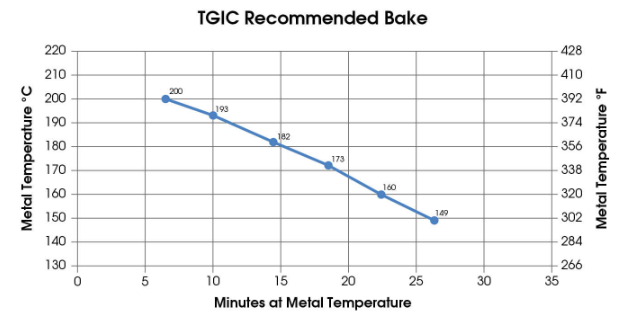
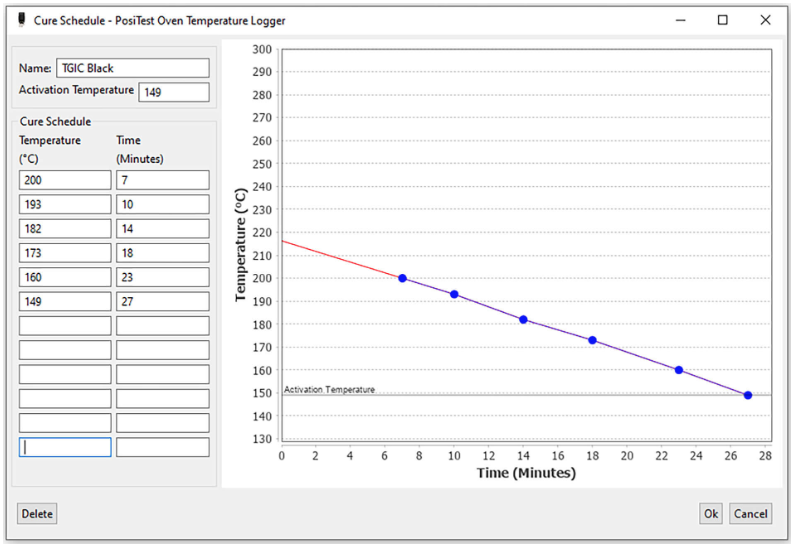
To properly cure powder coatings, most powder coating suppliers will specify at least one pair of substrate times and temperatures to ensure proper curing. For example, a common powder supplier specifies the following "cure schedule" for one of their polyester TGIC powders:
7 minutes at 200°C (392°F)
10 minutes at 193°C (379°F)
14 minutes at 182°C (360°F)
18 minutes at 173°C (343°F)
23 minutes at 160°C (320°F)
27 minutes at 149°C (300°F)
The north and south tides remind you: the specified temperature is the substrate (component) temperature, not the air temperature. In practice, it is not possible to immediately heat the substrate to a selected temperature, maintain that temperature, and then immediately cool the part back to room temperature.
Instead, most part temperatures follow a "bell-shaped" curve. Measuring only the elapsed time a part has been above a selected temperature may distort cure:
1. When the part is heated and cooled, it will be above the activation temperature (lowest curing temperature) but below the target temperature for a period of time
2. Parts usually stay above the target temperature for a period of time when passing through the oven
In addition to measuring the elapsed time at the selected temperature, it is valuable to consider the curing of the part above and below the target temperature.
How to set a curing plan for PosiTest OTL in PosiSoft software?
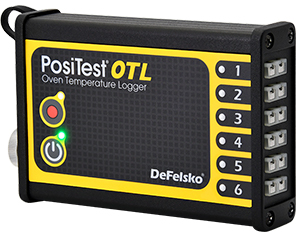
The PosiTest OTL Oven Temperature Logger is combined with DeFelsko's PosiSoft desktop software to calculate the cure index, developed specifically for the powder coating industry. through single
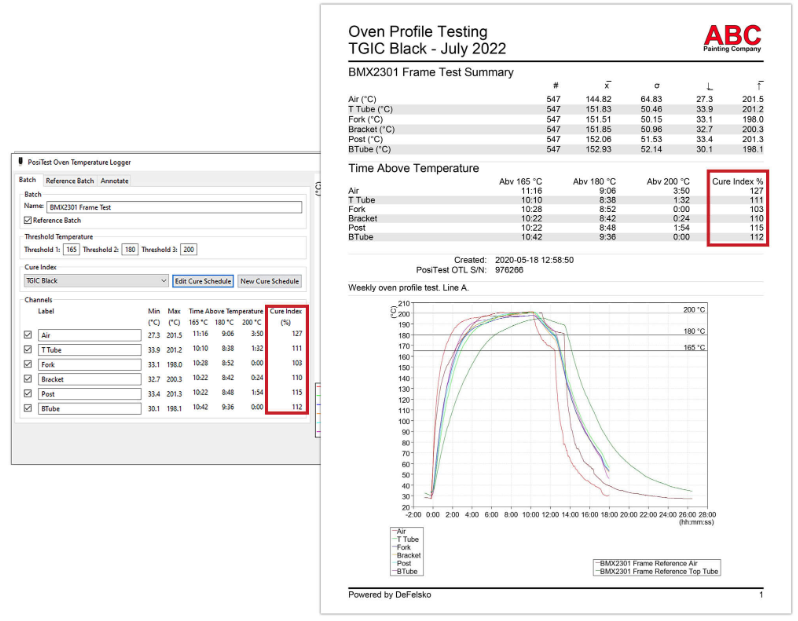
One number, the cure index, makes it easy to determine if a powder coating has been sufficiently cured based on the manufacturer's cure schedule. Slow (but meaningful) curing at temperatures between the activation temperature (minimum curing temperature) and the target temperature, and accelerated curing when the part is above the target temperature. The result is a percent cure index: a cure index above 100% indicates that the coating is fully cured, while a cure index below 100% indicates that the coating may not be fully cured and therefore may not have achieved its specified material properties. In general, most Film Applicators set oven conditions to maintain a "safety margin" above 100% cure to ensure day-to-day variations do not affect cure.
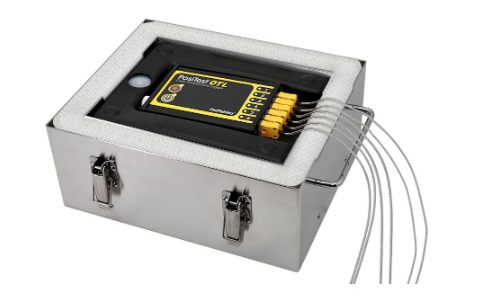
To measure the cure index, simply connect the temperature probe to the PosiTest OTL oven temperature logger and the desired location on the uncoated part to be measured. Start PosiTest OTL and press the record button to start recording. Place the logger in the barrier box and send it into the oven. Measure temperature at up to 6 locations at 2-second intervals as the logger and part pass through the oven. Once complete, connect the logger to the PC/Mac via USB and import the measurement data into the included PosiSoft Desktop software. For simplicity and organization, recorded measurement data is imported into its own batch (group).
Double-click the newly imported batch to open the PosiSoft OTL batch editor, then select a previously entered curing plan or select "New curing plan" to create a new one.
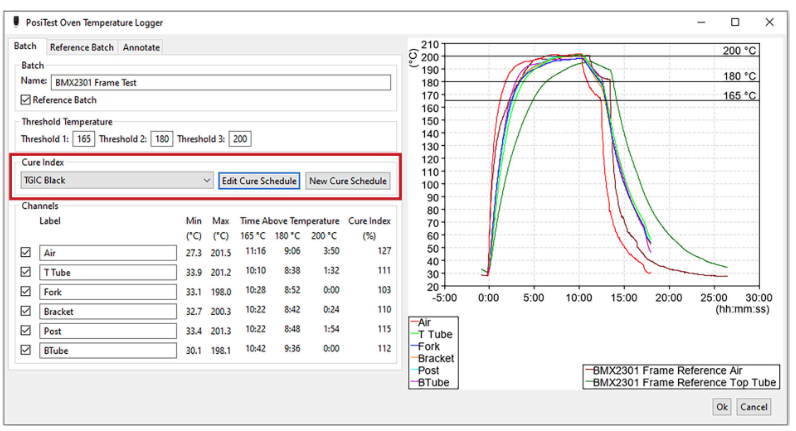
In the cure plan editor, enter the cure plan or cure profile specification recommended by the powder supplier. In addition to activating temperature, time/temperature specification pairs (up to 12 pairs) can also be entered. The activation temperature (minimum cure temperature) is the supplier defined minimum temperature at which cure begins. If no activation temperature is added, the lowest time/temperature specification is assumed to be the activation temperature.
After the curing plan has been created, the curing index will be displayed in the PosiSoft OTL batch editor and on all reports, making it easy to determine at a glance whether full curing has been achieved for each measurement location.
For more information on the PosiTest OTL Oven Temperature Logger, read the article How to Use an Oven Temperature Logger and Reporting Software for Better Process Control.


- 1What is the rule of the temperature setting curve of the paint curing furnace, and how to set the temperature range of the furnace?
- 2Netherlands TQC CX2005 Furnace temperature tracker Incubator operation manual
- 3Netherlands TQC CX2004 Furnace temperature tracker Incubator operation manual
- 4Netherlands TQC CX2003 Furnace temperature tracker Incubator operation manual
- 5How to measure the temperature on site with EasyTrack2 furnace thermometer
- 6CURVEX Furnace temperature tracker application example
- 7Linear dispersion test in high temperature heat treatment
- 8Tracking measurement of drying tunnel temperature
- 9Why does the curing process of powder coating need to monitor the furnace temperature?


