

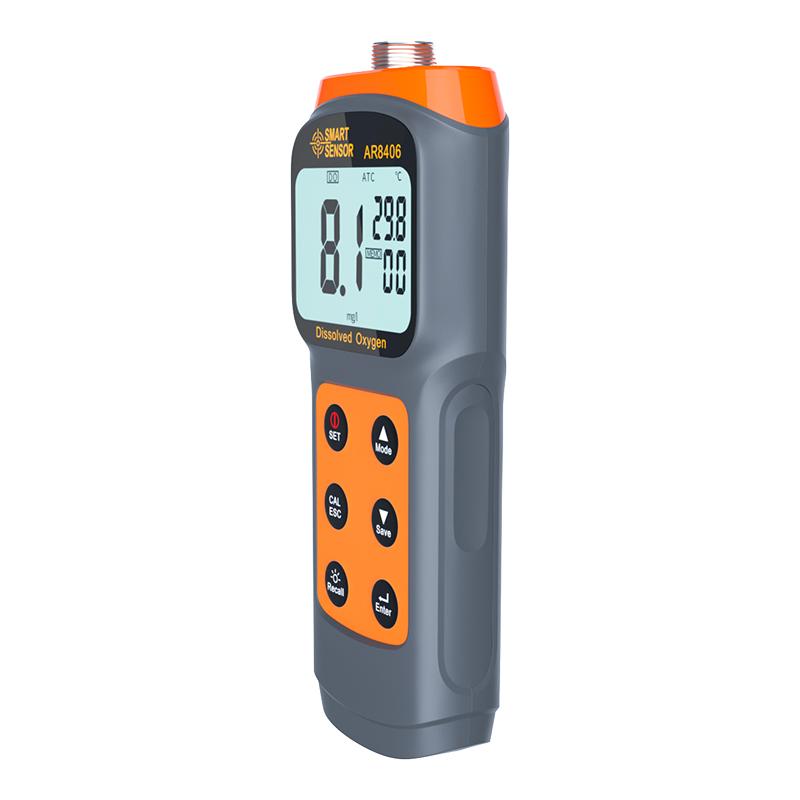


SMART SENSOR AR8406 Dissolved Oxygen Meter dissolved oxygen measurement meter split Dissolved Oxygen Meter
SE AR8406


SMART SENSOR AR8406 Dissolved Oxygen MeterSPEC
SMART SENSOR AR8406 Dissolved Oxygen MeterDetails
SMART SENSOR AR8406 Dissolved Oxygen MeterPacking list

- SKU
- NB038551
- DO Measurement Range
- 0.0~30.0mg/L
- DOS resolution
- 0.1mg/L
- DO measurement Accuracy
- ±3.0%FS
- DO correction
- 100% saturated oxygen in the air
- Temperature Measurement Range
- -5℃~60℃
- Temperature Resolution
- 0.1℃
- Automatic shutdown
- Automatic shutdown after one hour of no operation
- Temperature unit
- ℃/° F switching
- screen display
- LCD large screen display
- Automatic temperature compensation ATC
- support
- Altitude compensation
- 0~3500m
- Probe line length
- About 3.5 meters (plus probe)

Key Function

SET key: Short press to switch on/off/long press to enter the setting mode
CAL/ESC key: long press in measurement mode to enter calibration mode / short press in setting mode to exit setting mode
Recall key: short press to turn on or off the backlight / long press to view the saved data, press the up and down keys to view the recorded data one by one, press the ESC key to exit the record viewing mode.
Mode/▲ key: increase value/switch mode
Save/▼ key: Short press to decrease value/switch mode/measurement mode to save data manually (up to 99 items)
Enter key: confirmation key
Measurement methods
Put the measuring rod head to the depth of the water layer to be measured (the measuring rod head cannot touch the bottom of the pool), and keep swinging the measuring rod back and forth or left and right (if you do not swing the measuring rod, the measured value will continue to drop, lower than the actual dissolved oxygen value), after 1 to 3 minutes, the temperature of the measuring rod and the temperature of the water layer to be measured reach equilibrium, and the measurement data can be recorded. For seawater occasions or plateau areas, salinity .
- 1JJF 1714-2018《Program of Pattern Evaluation of Low-level Dissolved Oxygen Meters》
- 2JJF 1565-2016《Calibration Specification for Water Quality On-line Analyzers of Heavy Metals》
- 3JJF 1441-2013《Program of Pattern Evaluation of Dissolved Oxygen Meter With Covered-Membrane-Electrode》
- 4JJG 2104-2024《Calibration Specification for Seawater Dissolved Oxygen Analyzers》
- 5CJ/T 139-2001《Dissolved Oxygen Meter with non-membrane electrode》
- 6HJ 925-2017《Technical requirement and test procedures for portable dissolved Oxygen Meter》
- 7 096-2007《Test method of seawater dissolved oxygen analyzer》
- 8SC/T 7006-2001《Dissolved Oxygen Meter》
- 9GB/T 12157-2007《Water for industrial circulating cooling system and boiler -Determination of dissolved oxygen》
- 10GB/T 20245.4-2013《Expression of performance of electrochemical analyzers - Part 4: Dissolved oxygen in water measured by membrane covered amperometric sensors》