
SK-6500-32 Industrial touch screen host controller 32 channels, only with historical data
SE SK-6500-32

Skyeaglee SK-6500-32 Industrial touch screen host controllerSPEC
Skyeaglee SK-6500-32 Industrial touch screen host controllerDetails
Skyeaglee SK-6500-32 Industrial touch screen host controllerPacking list

- SKU
- NB039958
- Number of channels
- 32 channels
- Input power
- AC220V
- Output Power
- DC24V/2A
- power consumption
- Less than 7W
- Measurement unit
- ppm、ppb、%LEL、%VOL、mg/m3、mg/L、g/m3、ug/m3、%rh、℃、MPa、KPa、 Pa etc.
- Installation method
- Wall mounted
- Alarm settings
- 4 modes freely set
- Receive signal
- 4-20MA, RS485 (standard ModbusRTU protocol)
- Alarm method
- Buzzer alarm
- Output touchpoint
- Default 4 normally open touchpoints, touchpoint Capacity 30V/3A or 250V/3A, relay module expandable
- Output touchpoint
- Crossconfigurable
- temperature
- -20~70 ℃, Humidity: 0~90% RH No condensation
- Host hole size
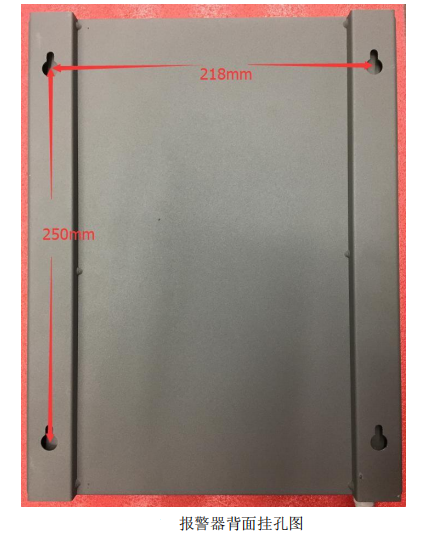
- The back has 4 wall-mounted screw holes, the large hole is 11mm, the small hole is 5mm, and the hole spacing is 250mm * 218mm.
- Dimensions
- 330*270*115mm
- interface
- 1. RS485; 2. Three-wire system 4-20mA

Introduction
This management host uses a 7-inch, 260,000 true-color display, four-wire resistive touch panel, accurate touch accuracy, durability, and long touch life. It is also equipped with a high-performance Cortex M4 processor with a main frequency of up to 180MHz. The data storage mode is U disk storage, which stores a large amount of data and provides convenience for later data analysis.
Special feature
1. Password login to prevent misuse by irrelevant personnel;
2. The channel can be set freely, which is convenient for users to configure flexibly;
3. U disk storage of historical data;
4. History alarm U disk storage;
5. The time interval of historical data recording can be set;
6. Free setting of 4 alarm modes;
7. Time display and setting;
8. Simultaneously support up to 32 channels of 485 devices + 16 channels of 4-20mA devices;
9. The default 4-way passive dry node output, can be equipped with relay expansion modules and so on according to user needs.
Host Dimensions
Internal Circuit Structure Diagram
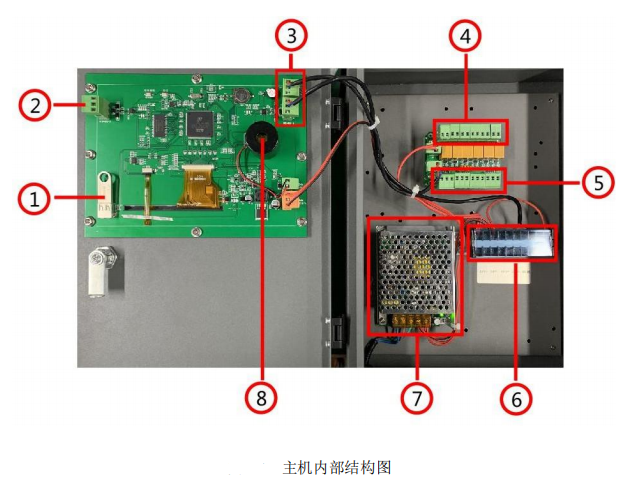
1) U disk interface, used to store historical data and historical alarm information.
2) RS485-2 interface, as an external DCS or PLC to read the RS485 slave interface of the local monitoring data, as a slave, the address of the slave can be modified in the "system settings";
3) RS485-1 interface, as the host interface for reading the real-time concentration value of the Detector;
4) The relay output is a passive dry node. The default number corresponds to 33, 34, 35 and 36 in the "Relay Number" in the "Slave Settings" from left to right, and then the total low-report output from 33 to 36, and a total high report output of 33 to 36;
5) 4-way 4-20mA input interface, three-wire connection method, the corresponding "slave number" is 33, 34, 35 and 36 from left to right, and the definition of each 3-core interface is 24V- from left to right , current input and 24V+.
6) External terminal block, including one 24V power supply and RS485-1 interface, which is used to supply power to the external Detector and read the data of the external Detector through the RS485 interface;
7) 24V/2A AC220V to DC24V switching power supply to supply power for the entire system;
8) Built-in alarm buzzer, after enabling "Alarm Sound" in "System Settings", when a slave alarm occurs, it will drive the buzzer to send out a fire alarm.